Contents
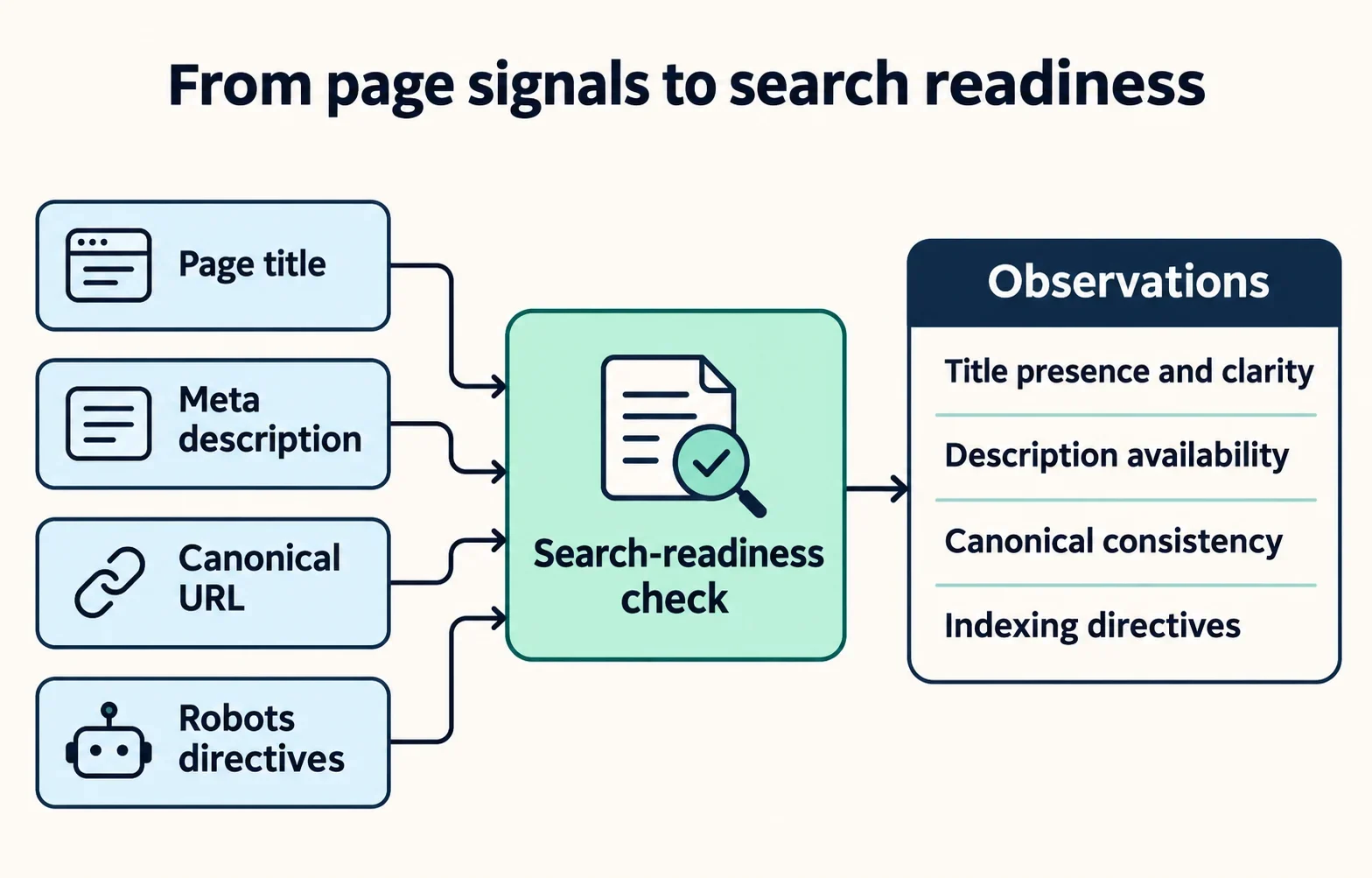
Page titles, meta descriptions, canonical elements, and robots directives are among the most visible HTML signals that can shape how a page appears in search results. Each signal has a distinct role, yet search engines can combine, interpret, or even override them based on their own crawling and indexing decisions. Beginners often confuse what an editor controls with what a search engine ultimately shows, so a clear division between page-level inputs and search-engine outcomes is useful.
Site Check Bench offers an on-demand search-readiness check that returns HTML observations for public URLs you supply. It inspects titles, descriptions, canonicals, robots directives, and heading structure in the server-returned HTML, then presents results with a timestamp and context on a results bench. This guide walks through each signal, explains what the check can and cannot guarantee, describes how the signals may work together in search results, and offers a practical path for turning an observation into a recommendation without inventing audit conclusions.
What titles, descriptions, canonicals, and robots directives each do
Titles
The title element is a page-level HTML signal that names the page. Every page should have a title specified in the title element. Good practice is to make the text descriptive, concise, not keyword-stuffed, distinct per page, and free of repeated boilerplate. The title element appears in the page’s HTML head and may influence the title link shown in search results, but search engines are not required to use it exactly as written.
Meta descriptions
The meta description is an HTML attribute in the page head that offers a short summary of the page’s content. It does not directly control ranking, but it can appear as the descriptive text beneath a title link in search results. Search engines may use the provided description, rewrite it, or pull text from elsewhere on the page depending on the query and page content.
Canonical elements
A canonical element indicates the preferred version of a page when similar or duplicate content exists across multiple URLs. It is a hint, not a command, and search engines may choose a different URL as canonical based on signals such as internal links, sitemaps, and user behavior. Canonicals help consolidate duplicate-page signals, but their presence does not guarantee that the specified URL will be the one shown in results.
Robots directives
Robots directives tell search engines how to treat a page during crawling and indexing. A robots meta tag in the HTML head can include instructions such as noindex, which suggests the page not be included in search results, and nofollow, which suggests not following links on the page. These are separate actions: noindex addresses inclusion, while nofollow addresses link discovery. X-Robots-Tag can deliver similar directives through HTTP headers and may be required for non-HTML resources or when page-level HTML tags are impractical.
Google supports specific user-agent tokens in the robots meta tag, including googlebot for all text results and googlebot-news for news results; other values are ignored. When multiple robots rules apply to the same page, the most restrictive rule generally takes effect. For example, if a page includes both max-snippet:50 and nosnippet, the nosnippet directive can prevent a snippet from appearing because it is the more restrictive instruction.
What editors control versus what search engines decide
Editors can write titles, descriptions, canonicals, and robots directives in HTML. What they cannot control is whether a search engine crawls the page, indexes it, shows the provided title link, uses the meta description, or honors the canonical preference. A single HTML observation shows what is present at crawl time, not what a search engine will ultimately display.
How Site Check Bench returns these signals
User input and observation
Users add one or more public URLs and run an on-demand server check. Each observation includes a result, timestamp, and context. The check reviews titles, descriptions, canonicals, robots directives, and heading structure in the returned HTML and returns observations on a results bench. It reads signals present in the server-returned HTML for the supplied URL.
What is outside scope
The check does not crawl external files such as linked CSS, JavaScript assets, images, or documents unless those resources are themselves supplied as URLs to check. It also does not inspect robots.txt files, sitemaps, or server configurations beyond the returned HTML for each requested URL. Findings are limited to what the server returns for that request.
HTTP status and availability context
The availability check checks HTTP status and follows the redirect path; it is not an uptime percentage or background polling service. A returned HTTP 2xx or 3xx status indicates that the server responded to the request, but it does not by itself confirm that the title, description, canonical, or robots signals are correct, complete, or honored by search engines. It also does not prove the page is indexed or will appear in search results.
What the report guarantees and does not guarantee
The report surfaces observable HTML signals at the time of the check. It does not guarantee search-engine behavior, ranking outcomes, indexing status, or future availability. Timestamps and context help readers understand when the observation was made, which matters because HTML can change between checks. Sample observations should be labeled as samples and kept separate from live checks so clients do not mistake a historical snapshot for a current audit conclusion.
How the four signals work together in search results
Joint interpretation by search engines
Titles, descriptions, canonicals, and robots directives are read together by search engines as part of indexing and result rendering. A robots noindex directive can keep a page out of search results regardless of how strong its title or description is. A canonical element can signal a preferred URL among duplicates, but search engines weigh it against other signals. Meta descriptions may appear under title links, while titles may influence the clickable title link itself.
When Google may override a page’s title element
Google can choose a different title link than the page’s title element. This may happen when the title is missing, boilerplate, overly long, keyword-stuffed, or not descriptive of the page content relative to the user’s query. Google may draw alternative title-link text from heading content, visible page text, anchor text from links to the page, or other sources it considers more useful for that specific search. Because of this, writing a strong title element is a best practice, not a guarantee of the exact title link shown.
Conflicting robots rules
When a page has both max-snippet:50 and nosnippet robots rules, the more restrictive directive generally prevails. In this combination, nosnippet can prevent a snippet from appearing in search results even though max-snippet attempts to allow a limited snippet length. Readers should check whether multiple robots directives apply and understand that restrictive instructions can override permissive ones.
Timing and recrawling
After a page is recrawled, it can take time for Google to notice updates to title-link sources and other signals. There is no fixed update window that applies to every page, so a revised title or description may not appear in search results immediately. Checking the live page HTML confirms what is currently published, but not when a search engine will next process it.
User-agent support
Google supports googlebot for all text results and googlebot-news for news results in the robots meta tag; other values are ignored. If a directive targets an unsupported user-agent token, Google may not apply it as intended. This matters when a report lists robots directives for client review: the supported token should be confirmed before recommending changes.
noindex versus nofollow
noindex and nofollow serve different purposes. noindex suggests that a page not be included in search results, while nofollow suggests that search engines not follow the links on that page. A page can have one, both, or neither directive. Confusing them can lead to recommendations that do not match the client’s goal, such as asking for nofollow when the actual objective is to keep a page out of results.
Turning an observation into a client-ready recommendation
Map findings to decisions
Start with the observable HTML result from the check: which signals are present, which are missing, and which may conflict. Translate each finding into a conditional next step rather than a definitive audit conclusion. For example, if a page lacks a title element, the recommendation can be to add a descriptive, concise, per-page title following published best practices. If a robots meta tag includes noindex on a page the client wants visible, the recommendation can be to review whether that directive is intentional.
Label samples and separate them from live checks
Sample observations should be clearly labeled as samples and separated from live checks. A sample shows what was observed at one point in time; a live check reflects the most recent on-demand scan. Mixing them can make a historical snapshot look like a current status, which overstates what a single check proves.
White-label export content
A white-label export can include the observed URL, check timestamp, signal findings, context, and recommended next steps without requiring an account or upload. The export should avoid presenting the observation as proof of indexing, ranking, or search-result appearance. It can note that search engines may override titles, descriptions, and canonical preferences, and that robots directives are hints subject to search-engine interpretation.
Wording for branded local reports
Use cautious, evidence-based wording. Instead of saying “this page will rank” or “Google will show this title,” say “the page currently contains this title element” or “the robots directive observed at check time was noindex.” Where helpful, include a verification step: ask the client or developer to confirm whether the observed directive matches the intended publishing goal, and to monitor search results after recrawling because updates may take time to appear.
Comparison table for client conversations
| Observable finding | Possible meaning | Suggested client message |
|---|---|---|
| Title element present | Page has a named title | The title exists in HTML; search engines may still choose different title-link text. |
| No title element | Page lacks a page-level title | Consider adding a descriptive, concise title unique to this page. |
| Meta description present | Page includes a summary | Search engines may use, rewrite, or replace this description. |
| Canonical element present | Preferred URL is indicated | Search engines may choose a different canonical based on other signals. |
| noindex robots directive | Page may be excluded from results | Confirm whether exclusion is intentional; check after recrawling. |
| nofollow robots directive | Links may not be followed | Distinguish this from noindex; they control different behaviors. |
| max-snippet:50 and nosnippet together | Conflicting snippet rules | The more restrictive rule generally prevails; verify intended behavior. |
Reader questions to ask before finalizing
- Which HTML elements does the search-readiness check read, and which external files are outside its scope?
- What does a returned HTTP 2xx or 3xx status tell you about the title, description, canonical, and robots signals on that URL?
- When can Google choose a different title link than the page’s title element?
- What happens when a page has both max-snippet:50 and nosnippet robots rules?
- Why should a report label sample observations and separate them from live checks?
- What information can be added to a white-label export without requiring an account or upload?
- How long can it take Google to notice updates to title-link sources after a page is recrawled?
- Which user-agent tokens does Google support in the robots meta tag?
- What is the difference between noindex and nofollow in a robots directive?
- When is X-Robots-Tag required instead of a robots meta tag?