Table of contents
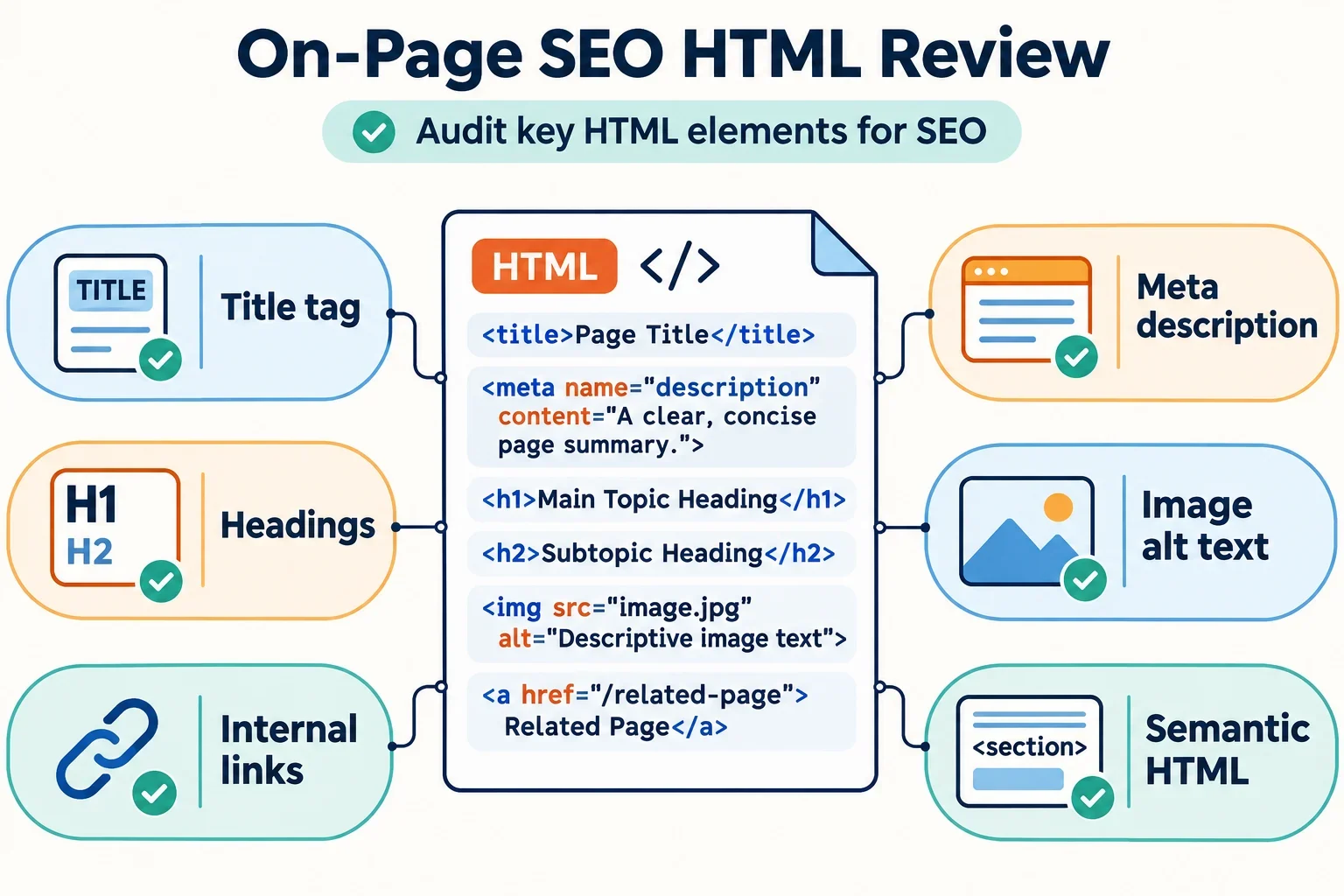
A single-URL on-page SEO review is one of the fastest ways to assess whether a page can be understood by search engines. Instead of auditing an entire website, you focus on one address and examine what the server returns in its initial HTML response. This narrow scope makes the workflow practical for beginners who want confidence that fundamental search-readiness elements are present before moving to broader technical or content questions.
This guide covers the elements to inspect in returned HTML, common misunderstandings beginners face, and how to separate what you can verify in HTML from signals that live elsewhere, such as robots.txt or the search index. Because pages can behave differently after JavaScript runs, relying only on what you see in a browser is not enough. The approach below helps you build a repeatable review habit and avoid early mistakes that lead to incorrect conclusions about a page’s visibility potential.
Search Readiness and HTML Inspection
Begin by retrieving the server-returned HTML for the URL you want to review. This is the raw response the server sends before a browser runs JavaScript or applies visual styling. From that HTML, check these search-readiness elements:
- Page title: Confirm the page contains a unique, descriptive
<title>element in the document head. The title should summarize the page topic and avoid duplication across your site. - Meta description: Look for a
<meta name="description">element describing the page content accurately. Although not always a ranking factor, it often appears in search results and can influence whether people click. - Canonical URL: Check for
<link rel="canonical">to identify the preferred version of the page. This can help clarify which URL should represent the content when similar or duplicate pages exist. - Robots directives: Inspect
<meta name="robots">in the HTML response, or check forX-Robots-Tagdirectives returned with the page, to see whether indexing and following are permitted. - Heading structure: Review heading elements such as
<h1>,<h2>, and<h3>in order. A logical heading structure helps both users and search engines understand the page hierarchy.
Record what you find for each element instead of relying on memory. A simple spreadsheet or notes document works well: list the URL, the value present, whether it is missing, and any obvious issues such as duplicate titles or empty descriptions.
If a required element is absent, treat it as a candidate for improvement rather than assuming the page cannot appear in search. Missing elements reduce clarity, but search engines may still discover and index content through other signals. Use your findings to decide what to fix, what to verify further, and what can wait.
Server-returned HTML versus rendered page
Server-returned HTML is the initial response before JavaScript runs. Content added after page load may not appear in this initial HTML, so an on-page review limited to server-returned HTML cannot confirm what users eventually see or what search systems index after rendering.
When to verify beyond HTML
Search index status, robots.txt rules, and JavaScript-rendered content are outside a strict server-returned HTML review. If you need to know whether a page is actually indexed, use official search engine tools rather than inferring status from the HTML alone.
How to choose which URL to review
Select one canonical URL at a time. Reviewing multiple URLs together increases the chance of mixing up page-specific values, especially titles, descriptions, and canonical links.
Practical steps
- Fetch the server-returned HTML for the target URL.
- Note the title value, meta description, canonical link, robots directives, and heading sequence.
- Compare findings against the page topic and site patterns.
- Document missing or duplicate elements as improvement candidates.
- Decide which issues to fix first based on page importance and traffic goals.
Avoiding Common Beginner Mistakes
One of the most common beginner mistakes is assuming that what appears in a browser window is the same as what is present in server-returned HTML. Modern pages often load content dynamically through JavaScript after the initial HTML arrives. Elements added by JavaScript may be visible to visitors, but they are not necessarily present in the raw HTML response you inspected first. For a search-readiness review based on HTML, base your conclusions on the server response, not only on the rendered page.
Another misunderstanding involves robots.txt. A robots.txt file lives at the domain level and tells crawlers which parts of a site they may or may not request. It is separate from page-level robots directives found in HTML headers or HTTP headers. Finding a noindex directive in a page’s HTML does not replace checking robots.txt, and finding an allow rule in robots.txt does not guarantee that a page contains index-ready HTML content.
Search index status is also outside this check. Even if every HTML element looks correct, that does not mean the URL is currently indexed, ranked, or receiving search traffic. Index status depends on crawling, rendering, indexing decisions, and many other signals beyond a single page’s returned HTML. Treat the HTML review as a readiness check, not a guarantee of visibility.
To avoid these mistakes, keep three categories separate:
- Content present in server-returned HTML
- Content added or changed by JavaScript execution
- Site-wide crawl rules in robots.txt and current index status
When you find an issue, note which category it belongs to before deciding on a fix. For example, a missing meta description in HTML is an on-page issue you can address directly. A page missing from search results may require investigation into crawling, indexing, or JavaScript rendering, none of which are confirmed by an HTML-only review.
If you need to verify index status or crawl permissions, use official search engine tools and documentation rather than guessing from browser behavior or HTML alone.
Start with server-returned HTML
Open the page source or inspect the raw HTTP response before relying on what the browser displays. Look for the <title> element, meta description, canonical link, page-level robots directives, and heading hierarchy exactly as they arrive from the server. If those elements are absent or malformed in the HTML, fix them there first; do not assume JavaScript will make them search-ready.
Separate JavaScript-rendered content
Content inserted after page load may improve the visitor experience, but an HTML-only review does not confirm whether search systems see it in the initial response. If key titles, descriptions, or headings appear only after scripts run, treat that as a separate rendering question. Verify through tools that inspect raw HTML and, if needed, tools that show rendered output, then compare the two before drawing conclusions.
Do not confuse robots.txt with page directives
Robots.txt controls crawl permission at the site or path level, while meta robots tags and X-Robots-Tag headers control indexing at the page or resource level. An allow rule in robots.txt does not mean a page has proper on-page HTML elements, and a noindex tag in HTML does not replace the need to review crawl rules elsewhere.
Treat index status as a separate verification
Correct HTML does not guarantee that a URL is indexed, ranked, or receiving search traffic. Indexing depends on discovery, crawling, rendering, and ranking decisions that extend beyond one page’s source code. Use official search console or webmaster tools to check whether a specific URL appears in the index, and treat the HTML review as a prerequisite rather than proof of visibility.
Decide on fixes by category
Categorize each finding before acting:
- HTML issue: missing or duplicate title, weak description, broken canonical, heading-order problem, or incorrect page-level robots directive. Address these directly in the page source or template.
- JavaScript issue: important content exists only after execution. Determine whether the content should be present in server HTML or whether rendering checks are needed.
- Crawl or index issue: page blocked by robots.txt or absent from search results. Review crawl permissions and index status through official channels.
Questions to ask before publishing a fix
- Did I confirm the problem in server-returned HTML, or only in the rendered browser view?
- Is the missing content added by JavaScript after the page loads?
- Am I mixing page-level robots directives with site-level robots.txt rules?
- Have I checked actual index status through an official search tool, or am I inferring it from HTML?
- Which category does this issue belong to, and does the fix match that category?