Guide contents
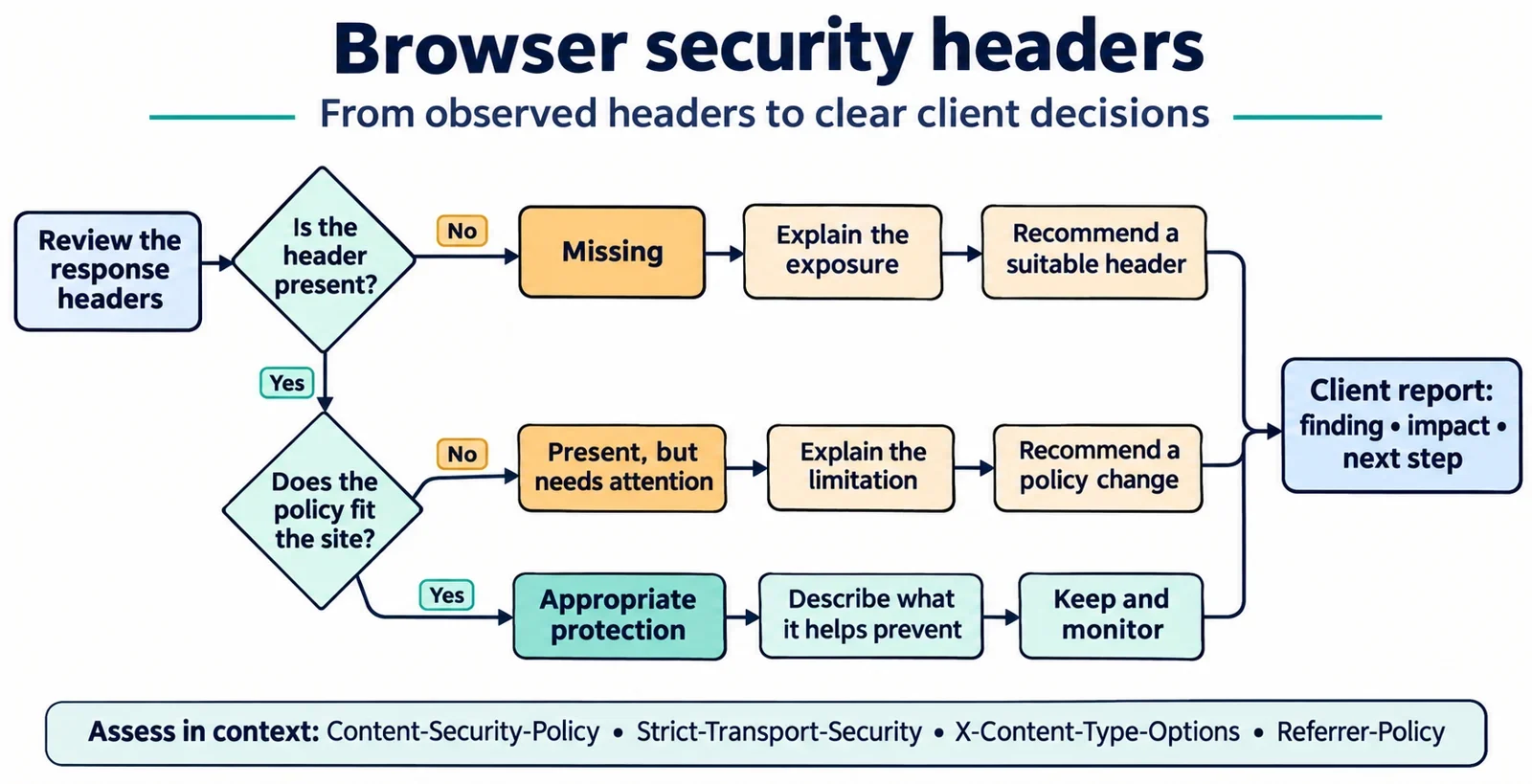
Browser security headers tell a visitor’s browser how to handle a website’s content, frames, connections, and caching. Explaining these headers to a client does not require deep technical training, but it does require discipline: report what was observed, avoid turning an observation into a security guarantee, and tailor findings to the pages the client actually uses. This workflow centers on sitecheckbench.top’s Browser Protection check, which inspects security headers and selected directives so a reviewer can make an informed configuration decision.
Before running anything, agree on scope with the client: which hostnames and environments to check, which public and authenticated routes to sample, whether redirects and error responses matter, and what response types appear, such as HTML, JSON, downloads, or user-provided files. The check works best when treated as one part of a larger configuration review, not as a vulnerability scan or certification. Below is a step-by-step workflow for running the check, interpreting headers in plain language, translating findings into client decisions, and reporting limits honestly.
What the security-header-check tool accepts and reports
The reviewer starts by providing the URL to check. The client or reviewer needs to supply a specific address before running the security-header check, because the tool inspects headers at that address rather than crawling a whole domain automatically. It is reasonable to ask whether the tool checks one URL or multiple routes at a time, and whether it can sample authenticated pages; if the packet does not confirm batch checking or authenticated sampling, treat those as unverified capabilities and plan manual sampling instead.
Sample observations are labeled in every export, and live checks should be run before sending a client audit. This means results returned by the tool should be treated as current observations at the moment of capture, not historical proof or a permanent grade. For each sampled route, capture the URL, status, redirect behavior, content type, relevant response headers, environment, and date of capture. Preserve observed header values rather than reducing everything to a pass/fail grade.
A homepage-only scan can provide an initial signal but cannot establish that every route, status code, or authenticated response behaves the same way. If the client’s site has login pages, API endpoints, downloadable files, or error pages, those should be sampled separately because header behavior can differ by response type and route.
Practical output workflow:
- Record the exact URL, environment, and capture date before running the check.
- Save the full header observation for each route, including status code and content type.
- Label any sample data clearly if it will appear in a client-facing export.
- Run a fresh live check just before sharing results with the client.
- Note which routes were not sampled so the client understands the scope boundary.
This output-first mindset keeps the conversation grounded in evidence the reviewer actually captured.
Common browser security headers in plain language
Technical header names can overwhelm a client. Translating them into what the header instructs the browser to do makes the findings useful without requiring the client to memorize syntax.
X-Frame-Options indicates whether a browser may render a page in a frame, iframe, embed, or object, helping avoid clickjacking by preventing content from being embedded into other sites. It is only useful when the HTTP response has something to interact with, such as links or buttons; it provides no security for redirects or JSON API responses. If a client sees this header missing on a JSON endpoint, that may be less concerning than its absence on a public landing page.
CSP is complex to configure and maintain; a policy can be present yet too permissive, or strict enough to disrupt required resources. A browser-oriented policy may matter on an HTML page that loads scripts but offer little value for a JSON response, so each header should be interpreted in the application’s context. When explaining CSP to a client, describe it as a rule list telling the browser which scripts, styles, images, and other resources are allowed to load and run.
X-Content-Type-Options with the value nosniff tells browsers to respect the declared media type instead of guessing, blocking MIME confusion attacks. In plain terms, it stops the browser from deciding a file is something other than what the server said it was.
Strict-Transport-Security instructs browsers to only access the website using HTTPS, even if a user attempts to connect over HTTP. If HSTS is misconfigured or the SSL/TLS certificate has problems, legitimate users might be unable to access the website until the HSTS duration expires. This makes HSTS a header where a misconfiguration can cause visible breakage, not just a missing best practice.
X-XSS-Protection is an older header for Internet Explorer, Chrome, and Safari; the recommendation is to not set it or explicitly turn it off because it can create XSS vulnerabilities in some cases. A reviewer should not treat its absence as a finding requiring urgent action.
For sensitive responses, no-store prohibits storage in compliant HTTP caches, while no-cache allows storage but requires revalidation before reuse. These headers matter most for pages containing personal or financial data, not for public marketing content.
Server and X-Powered-By disclose technology details but are not protective headers; minimizing them does not prevent other forms of fingerprinting. Removing or hiding these headers can reduce information leakage, but should not be presented as a security control on its own.
MDN lists TLS configuration, TLS resource loading, TLS HTTP redirection, HSTS implementation, clickjacking prevention, and secure cookie configuration among required or high-impact HTTP security features. This can help a reviewer prioritize headers that industry guidance treats as significant, while still framing the header check as an observation rather than a compliance verdict.
From observed headers to client decisions
Turning raw header results into client decisions requires matching the finding to the page type, audience, and business risk. A missing header is not automatically an emergency, and a present header is not automatically effective.
Start by classifying each sampled response. Is it HTML that loads scripts and accepts user input? Is it JSON consumed by a mobile app? Is it a redirect, an error page, or a file download? Headers designed for interactive HTML pages may offer little value on JSON responses, while cache-control headers may be critical for downloadable account statements but irrelevant for a public blog post.
Compare missing versus misconfigured headers carefully. A missing X-Frame-Options on a public marketing page is a different conversation from a missing cache-control header on a patient portal. A misconfigured HSTS policy can lock out legitimate users, so it may deserve faster attention than an informational header absence on a low-risk route. Explain to the client that “missing” means the browser did not receive the instruction, while “misconfigured” means the instruction exists but may be too broad, too narrow, or incorrectly applied.
Use proportionate next steps:
- Low-risk routes with missing informational headers: schedule for the next maintenance window, not an emergency patch.
- Interactive pages missing clickjacking or content-type protections: prioritize configuration review before the next release.
- HSTS findings: verify certificate health and rollout duration before enabling or changing, because mistakes can cause access outages.
- CSP findings: test in report-only mode if available, because strict policies can break required scripts and styles.
Agree with the client on retest conditions. A sensible retest condition after a header configuration change is to run a fresh live check on the affected routes and confirm the new header values appear in the response. Do not promise that one retest proves lasting correctness; configurations can drift, and new routes may be added later.
Capture evidence for each decision: URL, status, timestamp, header values observed, page type, audience relevance, and recommended action. This creates a repeatable record the client can hand to developers or auditors without exaggerating what the check proved.
Limits and honest framing for client reports
The single most important framing rule is that a header observation is not a vulnerability scan or security certification. The Browser Protection check inspects security headers and selected directives so a reviewer can make an informed configuration decision. It does not test every attack path, verify server patch levels, validate authentication logic, or certify that a site is secure.
A moment-in-time header observation shows what was present when the check ran. It does not prove headers were always present, will remain present, or protect against threats outside the header’s scope. For example, X-Frame-Options protects against certain embedding behaviors but does not stop all cross-site attacks. HSTS enforces HTTPS for browsers that honor it but does not fix a broken certificate or insecure application code.
When labeling sample results in a client-facing export, mark them clearly as sample observations and include the capture date and environment. Live checks should be run before sending a client audit so the report reflects current behavior rather than stale data.
A homepage-only result cannot establish domain-wide behavior. If the client asks whether the whole site is protected, the honest answer is that only the sampled routes were observed, and unsampled routes—especially authenticated or API endpoints—should be checked separately before drawing broader conclusions.
Avoid describing the tool as a security scanner, compliance validator, or penetration test. Use phrases like “observed header,” “moment-in-time check,” “configuration decision support,” and “not a security certification.” If the client needs a formal security assessment, recommend engaging a qualified security professional rather than implying the header check can substitute for one.
Finally, keep the report scoped to what was checked. List the hostnames, environments, routes, response types, and dates captured. Note explicitly which routes were excluded. This transparency builds more client confidence than overstated claims, and it gives the reviewer a defensible basis for future retests.