Table of contents
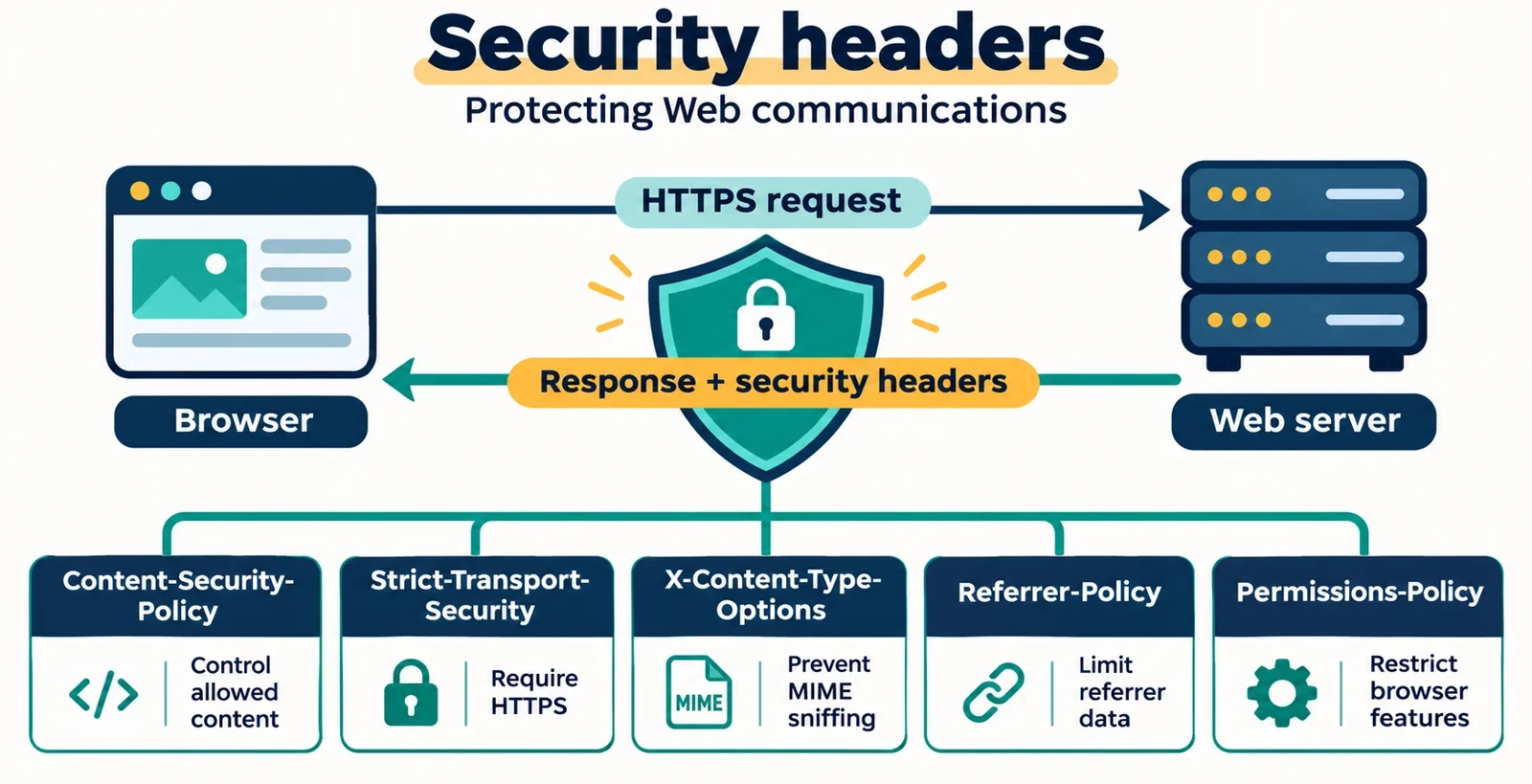
Website security headers are browser-native instructions included in HTTP responses that shape how browsers handle connections, content, permissions, and referrer information. Unlike server-side firewalls or application scanners, these headers operate on the client side, giving website operators an additional layer of protection against common threats such as cross-site scripting, clickjacking, MIME-sniffing, and protocol-downgrade attacks.
A security-header audit is the process of reviewing current response headers, identifying missing or misconfigured directives, and planning safe deployment. Deployment typically begins in reporting-only modes where supported, allowing teams to observe violations without blocking legitimate traffic. Over time, policies can be tightened toward full enforcement.
This guide walks through HTTP Strict Transport Security, Content-Security-Policy rollout, and essential response-header hygiene. It does not cover proprietary platform features or specific product configurations. Teams should verify header behavior against current browser documentation and their own infrastructure before making production changes.
HTTP Strict Transport Security (HSTS)
HTTP Strict Transport Security (HSTS) tells browsers to interact with a website only over HTTPS for a specified period. Once a browser receives a valid HSTS header, it automatically upgrades HTTP requests to HTTPS before they leave the user’s device, reducing exposure to protocol-downgrade attacks and cookie interception over unencrypted connections.
How HSTS works
An HSTS response header includes directives such as max-age, which defines how long the browser should remember the policy, and includeSubDomains, which extends the policy to every subdomain under the covered host. The optional preload directive signals intent to be included in browser HSTS preload lists, which can protect users even before their first visit to the site.
Planning before enabling HSTS
Teams should confirm that every page and subdomain covered by the policy is reliably served over HTTPS before enabling HSTS. A misconfigured policy can make a site inaccessible if HTTPS fails on any included host, because browsers will refuse to fall back to HTTP. Testing with a short max-age value first allows operators to observe effects and roll back if needed.
Risks of including subdomains in HSTS preload
Including subdomains in HSTS preload is particularly consequential. Once a domain is accepted into a preload list, removal can be slow and difficult. If any subdomain cannot serve valid HTTPS consistently, including it may break access for users whose browsers have already cached or preloaded the policy. Operators should inventory all subdomains, verify certificate coverage, and plan for certificate renewal failures before adding includeSubDomains or requesting preload inclusion.
Complementary controls
HSTS is not a replacement for server-side redirect configuration or secure cookie flags. It works best when combined with Always-on-HTTPS serving, Secure and HttpOnly cookie attributes, and routine certificate monitoring.
Reader checklist
- Have all covered hosts been verified to serve valid HTTPS?
- Does certificate coverage include every subdomain if
includeSubDomainsis used? - Is there a rollback plan if a renewal failure makes a subdomain unreachable?
- Are cookies marked Secure and HttpOnly alongside HSTS deployment?
Content-Security-Policy (CSP) Rollout
Content-Security-Policy (CSP) restricts which resources a browser may load and execute on a page, helping to reduce the impact of cross-site scripting and related injection attacks. A CSP policy can control scripts, styles, images, fonts, frames, and connections by listing allowed sources.
The safest way to adopt CSP is to start with Content-Security-Policy-Report-Only. In this mode, the browser does not block disallowed resources; instead, it sends violation reports to an endpoint specified by the report-uri or report-to directive. This lets teams observe what would break before enforcing any restrictions.
During report-only testing, teams should review reports for inline scripts, third-party scripts, dynamically loaded resources, and legacy plugins. Common violations often reveal shadow IT, outdated tag managers, or forgotten dependencies that were never documented.
Nonces are preferred over broad domain allowlists for inline scripts because a nonce is a unique, unpredictable token generated for each page request. A script tag carrying the correct nonce can execute, while an attacker who injects a script without the matching nonce is blocked. Domain allowlists can be bypassed if the allowed domain hosts any executable content, such as an open JSONP endpoint or an uploaded JavaScript file, making them less reliable in modern applications.
The strict-dynamic keyword further simplifies policy management by trusting scripts that carry a valid nonce or hash, and allowing those trusted scripts to load additional scripts dynamically. This reduces the need to list every third-party URL explicitly while still preventing unauthorized script execution.
A practical rollout sequence might look like this: deploy report-only mode with a broad policy, analyze reports over several weeks, add nonces to inline scripts, introduce hash-based allowlists for static resources, enable strict-dynamic where supported, and finally switch to Content-Security-Policy enforcement. Each stage should be tested in staging before production deployment.
Reader questions
How can teams safely test Content-Security-Policy without breaking existing production scripts?
Start with Content-Security-Policy-Report-Only so violations are reported but not blocked. Monitor report endpoints, identify breaking scripts, add nonces or hashes, then transition to enforcement after staging validation.
Why are nonces preferred over domain allowlists in modern CSP implementations?
Nonces are unique and unpredictable per request, so injected scripts without the matching nonce are blocked. Domain allowlists can fail if an allowed domain serves executable content such as an open JSONP endpoint or uploadable JavaScript file.
Example policy structure
- Default restrictive fallback
- Nonce-based allowances for trusted inline scripts
- Hash-based allowances for static known resources
- strict-dynamic to trust nonce-bearing scripts and their dynamically loaded children
- report-uri or report-to pointing to a violation-collection endpoint
Decision steps for rollout
- Deploy Content-Security-Policy-Report-Only in staging.
- Collect and review violation reports over an observation period.
- Remediate inline scripts with nonces or move them to external files.
- Add hashes for static resources where appropriate.
- Enable strict-dynamic if supported by target browsers.
- Switch to Content-Security-Policy enforcement after staging tests pass.
- Monitor production reports and adjust as new dependencies are added.
Essential Response Header Hygiene
Supporting response headers reduce the attack surface in ways that complement HSTS and CSP. Three commonly reviewed headers are X-Content-Type-Options, Referrer-Policy, and Permissions-Policy.
X-Content-Type-Options with the value nosniff instructs browsers to honor the declared MIME type instead of attempting to guess it. This matters because MIME-sniffing can cause a browser to treat a text file as executable script content if the file appears to contain code. Setting nosniff prevents browsers from guessing response types and turning text files into executable scripts. Teams should verify that origin servers and proxies consistently send this header on all responses, including error pages and user-uploaded content.
Referrer-Policy controls how much referrer information is sent when a user navigates away from a page or loads a cross-origin resource. Options range from no-referrer, which sends no referrer data, to strict-origin-when-cross-origin, which sends only the origin on cross-origin requests and the full URL on same-origin requests. Choosing a policy depends on whether the site needs referral analytics and whether it exposes sensitive URL parameters.
Permissions-Policy allows a site to declare which browser features it uses, such as geolocation, camera, microphone, payment handlers, or clipboard access. Restricting unused features can reduce the risk that a compromised page abuses sensitive device APIs. Policies can be applied to the current page, embedded iframes, or both.
Headers that expose implementation details, such as certain server version headers or powered-by headers, do not directly block attacks but can make reconnaissance easier for attackers. Removing or minimizing them is often considered good hygiene, though it is not a substitute for patching or access controls.
A response-header audit should include a checklist of headers present, headers missing, values that differ across environments, and headers whose behavior changes behind load balancers, CDNs, or web application firewalls. Teams should test in staging and confirm that changes do not break legitimate integrations.