Contents
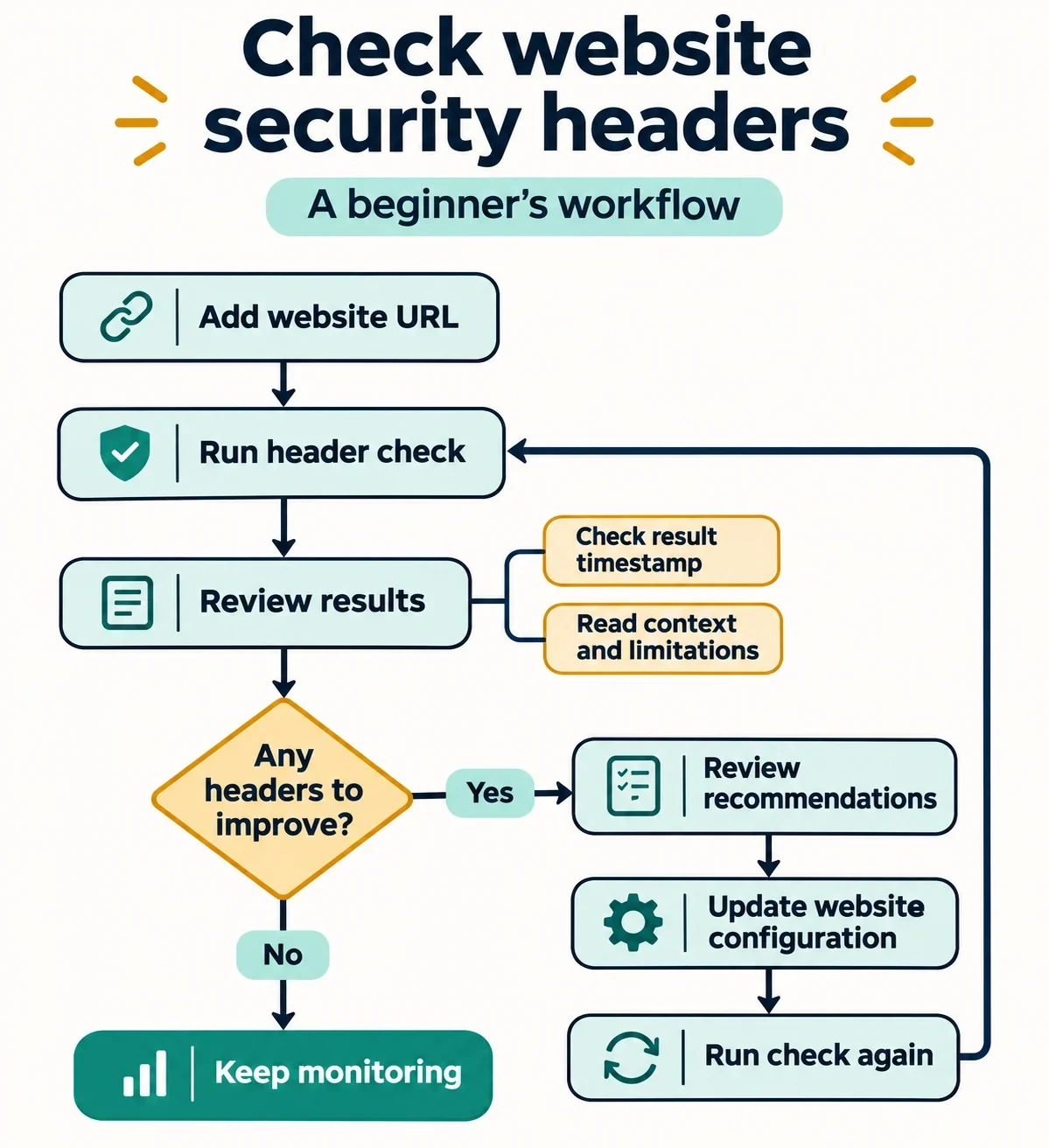
Website security headers are instructions sent by a server that tell browsers how to handle a page, its resources, and its connections. Reviewing them is a practical starting point for beginners who want to understand a site’s security posture without needing deep technical expertise. sitecheckbench.top provides a security-header-check tool designed for this kind of review: a user adds a URL, runs the check, and receives observations that include a result, a timestamp, and context.
This article explains what the tool covers, how to use its inputs and outputs, which common headers to review, how beginners can pair header checking with an accessible page-sampling approach, what header checks cannot detect, and how to prepare observations for sharing. The guidance keeps each claim bounded by what the source material states and avoids assumptions about pricing, policies, or availability beyond those stated facts.
What the security-header-check tool covers
The security-header-check tool inspects security-related HTTP response headers returned by a website. Before any check runs, the results bench shows no data: there are no URLs checked, no HTTP 2xx or 3xx counts, and no items flagged as needing review. Data appears only after the user adds a URL and initiates a check.
Each observation produced by the tool includes three pieces of information: the result of the check, when it occurred, and surrounding context. This structure helps a beginner see not just whether a header is present, but when it was observed and under what conditions.
Readers should not expect this tool to prove complete website security. It examines headers returned by the server and does not scan for every possible vulnerability, misconfiguration, or application-layer issue. A passing observation means a header was present and readable at check time; it does not guarantee that the overall site is secure or that the header is configured optimally for every scenario.
User inputs, outputs, and decisions
To use the tool, a beginner adds a target URL and runs the check. The tool then returns observations for that URL. Each observation contains a result, a timestamp, and context, which together support a simple decision workflow:
- Identify a URL to review, such as the homepage or another representative page.
- Add the URL to the tool and initiate the check.
- Read each observation’s result, timestamp, and context.
- Decide whether the header configuration needs attention, further testing, or discussion with a developer or site owner.
If a header is missing or appears misconfigured, the next step is not to change server settings directly from the tool output. Instead, the reader should record the observation, note the timestamp and context, and plan a follow-up review with the party responsible for the site’s server configuration. Observations can be compared across multiple URLs to see whether header behavior is consistent across the site.
Common security headers to review
MDN lists HTTP security guides in a recommended implementation order that considers both security impact and ease of implementation. The sequence includes TLS configuration, HSTS, clickjacking prevention, Content Security Policy, referrer policy, and other topics. Beginners can use this ordering as a practical checklist when reviewing header output.
Strict-Transport-Security, commonly known as HSTS, tells the browser that a site must always be loaded over HTTPS for a specific amount of time. This reduces the risk of connections being made over insecure HTTP.
Content-Security-Policy tells the browser which sources are allowed for scripts, styles, images, fonts, connections, iframes, and other resources. By limiting where content can be loaded from, it helps reduce the impact of cross-site scripting attacks.
X-Content-Type-Options with the value nosniff tells the browser not to guess the file type when the server has already sent a Content-Type header. This reduces the risk of the browser interpreting a file as a different type than intended.
Referrer-Policy controls how much source URL information the browser sends in the Referer header when navigating to another page. The value strict-origin-when-cross-origin sends full URLs within the same site and only the origin when navigating cross-origin.
Permissions-Policy limits which browser capabilities a page or its embedded frames can use. Examples include camera, microphone, and geolocation access. This header lets site owners restrict powerful features to only the contexts where they are needed.
These descriptions explain what each header instructs the browser to do. They do not prescribe specific values or guarantee that any particular configuration will prevent all attacks.
Accessibility review approach for beginners
A beginner can adapt basic accessibility checking ideas to a security-header workflow by selecting a sample of pages rather than checking only the homepage. A useful sample might include the homepage, text-based content pages, pages with images or video or audio, interactive tools and forms, login pages, PDFs, dynamic content, navigation pages, and pages about accessibility or legal information. The exact sample depends on what the site contains.
For each page in the sample, the beginner adds the URL to the security-header-check tool, runs the check, and records the result, timestamp, and context. Sampling multiple page types is valuable because headers can differ between sections of a site; a homepage may have one configuration while a login area or media section behaves differently.
If the website does not contain video, forms, or login functionality, pages representing those features can be excluded from the sample. For example, a simple text-only informational site may not need form pages or login pages in its review because those page types do not exist on the site.
The sitecheckbench.top viewport-review browser tool is a separate feature that lets users try a public page in common viewport sizes, with a direct link when embedding is blocked. Large viewports scroll within the bench while the page stays the same width. This tool is unrelated to header checking but may be useful when reviewing how pages render across devices after header changes are considered.
Every sample observation should be recorded with enough detail that another reviewer can understand which page was checked, when, and what the result was. This makes the findings easier to discuss with a developer, client, or internal team.
Limits of header checks
Security-header checks have clear boundaries. The tool checks server-returned HTML only. JavaScript content, robots.txt, and search index status are outside this check. Although one source statement about these limits appears under search readiness rather than under headers, the general principle remains: header output does not reveal everything about a site.
Header checks cannot detect vulnerabilities that do not appear in response headers, fix misconfigured headers automatically, or guarantee complete website security. MDN security guides do not cover all possible security scenarios and cannot guarantee complete website security. A header may be present but poorly configured, or absent because it is not applicable to that particular page.
Beginners should treat header results as one signal among many. If a result suggests a problem, the appropriate action is to investigate further with a qualified developer or site administrator rather than assume the issue is resolved or ignore it.
Preparing client or internal handoff
When preparing observations for a client or internal handoff, a beginner should collect each checked URL along with its result, timestamp, and context. These observations form the raw material of a report. If the platform offers local report export or white-label report options, those features can be used to format the findings, but the article does not assume specific branding, pricing, or export availability beyond what the source page states.
Each sample observation should be clearly labeled before sharing. Labeling identifies which page was checked, what header result was observed, when the check happened, and what context applied. Clear labels prevent confusion if the report is reviewed later or passed to someone who did not perform the checks. Unlabeled observations can be misattributed to the wrong page or misread as current when they were captured at a different time.
Recommendations included with the report should be framed as next steps, such as asking a developer to review a missing or misconfigured header, rather than as definitive fixes. The report should note that header checks do not cover all security scenarios and that further testing may be needed.
If certain page types were excluded because the site lacks video, forms, or login functionality, that scope note should appear in the report so the recipient knows what was and was not reviewed.