Contents
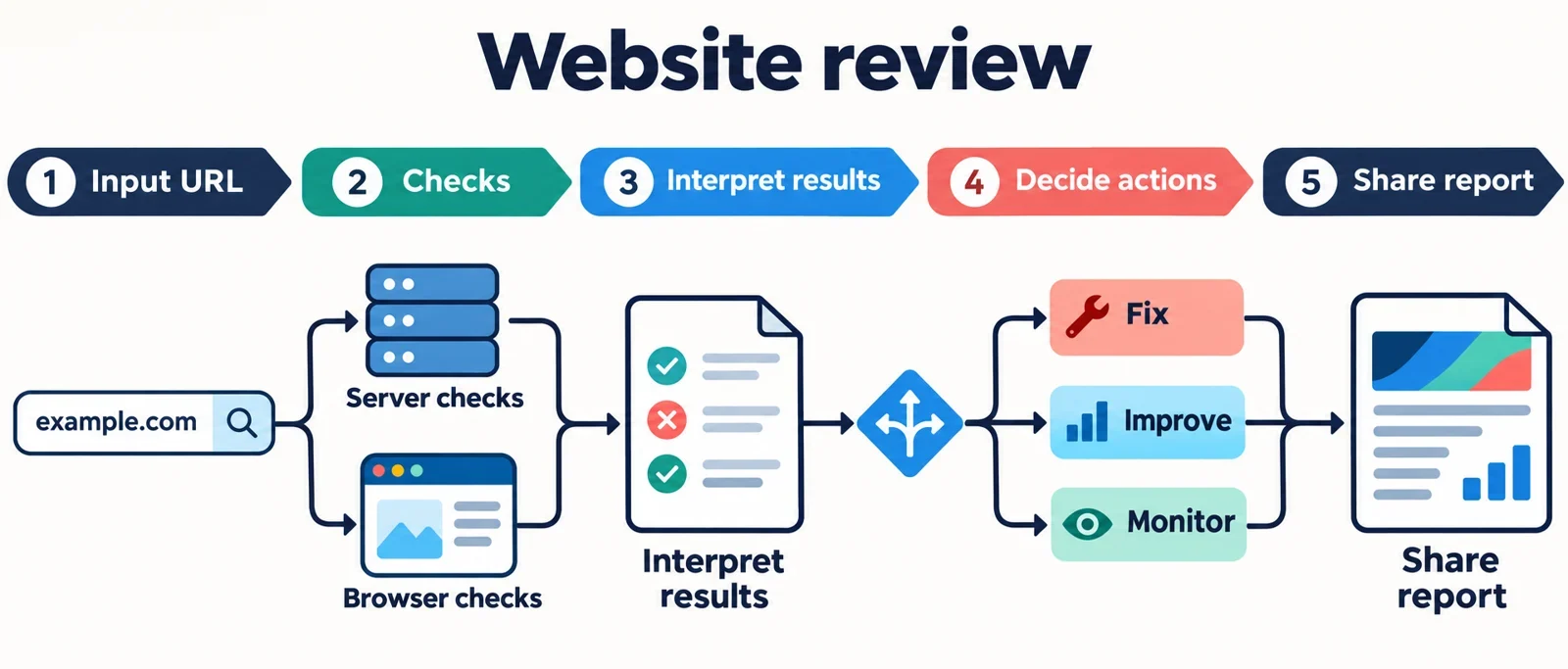
A branded website review benefits from a clear structure: start with what goes into each check, understand what each tool actually returns, turn those outputs into concrete decisions, and then package everything into a shareable report. This guide is written for readers who need to run and communicate a website review, not for people building the review tool itself. The description below stays within what sitecheckbench.top says about its own checks and report behavior, and it turns missing details into conditional planning advice rather than assumed features.
Start with inputs and available checks
According to the site’s description, sitecheckbench.top positions itself as a focused bench for a website review, moving from a URL to an informed next step with five server checks and one considered report. A reviewer typically begins by entering the URL of the page or site to examine. The brief identifies enabled tool identifiers including url-status-check, seo-audit, performance-check, security-header-check, uptime-check, responsive-preview, and white-label-report.
URL input before running checks
Before running a check, the reviewer supplies the target URL. For example, checking HTTP status and following the redirect path requires a URL so the tool can request the page and observe where it leads. Reviewers should enter the exact address they intend to review, including https:// if applicable, rather than a homepage when a subpage is the subject of review.
Server-side checks
Five server checks cover distinct areas of the page’s response. One check examines HTTP status and follows redirects. Another reviews HTML elements such as titles, descriptions, canonicals, robots directives, and heading structure. A third observes response latency, downloaded body size, and caching headers from the WordPress server. A fourth inspects security headers and selected directives. A fifth monitors uptime status.
Browser-side preview
The responsive preview check lets the reviewer try a public page in common viewport sizes. If embedding is blocked, the tool may provide a direct link instead of an inline preview. Reviewers should be prepared to open that link separately to inspect how the page appears at different sizes.
Report generation
After checks run, a considered report can be produced. The white-label-report capability suggests report identity options may be available, but readers should verify current branding and watermark behavior before assuming a specific appearance.
Because this structure relies on the service’s stated capabilities rather than a feature wishlist, any input field not described here should be treated as something to confirm on the actual tool page before beginning a review.
Interpret outputs and limits per tool
Each tool returns specific observations, and each has intentional limits. Understanding both prevents overstating what a single check proves.
HTTP status and redirect output
The status check returns the HTTP status code and the redirect path, if any. It helps a reviewer decide whether a page needs attention, such as a missing page, a server error, or an unexpected redirect chain. It does not by itself prove why a redirect exists or whether the destination is correct for users.
SEO audit output
The SEO audit reviews titles, descriptions, canonicals, robots directives, and heading structure from the returned HTML. It surfaces what is present in the markup at crawl time. It does not evaluate search ranking, user intent, or whether search engines will index the page in practice.
Performance check output
Performance output includes response latency, downloaded body size, and caching headers observed from the WordPress server. These figures describe one request under current conditions. They do not represent all visitor experiences, mobile network performance, or sustained load behavior.
Security header check output
The security check inspects security headers and selected directives. Reviewers can use it to make an informed configuration decision, such as whether certain headers are present or missing. It does not certify that a site is secure overall, nor does it test vulnerabilities beyond header presence.
Uptime check output
Uptime output reports whether the monitored address responds during the check window. It does not guarantee future availability or measure user-facing performance during an outage.
Responsive preview output
The preview shows a public page in common viewport sizes, with a direct link when embedding is blocked. It offers a visual reference at specific sizes. It does not cover every device, browser, or interaction, and blocked embedding means the reviewer must open the link externally.
When a tool does not return a value readers expect, the missing detail should prompt verification rather than assumption.
Turn observations into decisions
Review findings become useful when they lead to specific next steps. Each check supports particular decisions, but no single check guarantees a complete review outcome.
Prioritizing by check type
HTTP status and redirect findings often drive immediate technical attention: a 4xx or 5xx status, or a redirect loop, typically needs correction before other optimizations matter. SEO findings such as missing titles, descriptions, canonical tags, or problematic robots directives guide content and markup updates. Performance findings around latency, body size, and cache headers suggest where to ask about hosting or asset optimization, though the reviewer should confirm whether the observed numbers reflect typical conditions. Security header results inform configuration reviews, such as whether to add or adjust headers. Uptime results can prompt a check of hosting status or monitoring setup. Responsive preview results highlight layout issues at specific viewport sizes that warrant closer inspection.
Combining checks for a fuller picture
Because one check cannot prove overall site health, reviewers should combine outputs. For example, a page might return HTTP 200 but have missing canonical tags and absent security headers; the review decision would address both content markup and server configuration rather than treating the status code as evidence that everything is fine.
Avoiding overstatement
Reviewers should avoid claiming that a check guarantees rankings, security, speed for all users, or continuous availability. Instead, frame each finding as evidence for a specific next step, such as asking a developer to inspect redirects, updating HTML metadata, or verifying caching behavior under typical traffic.
Where the tool output is unclear or missing, the review plan should include a verification step with the site owner or hosting provider before finalizing recommendations.
Create and share branded reports
The final stage turns individual findings into a report that can be shared with stakeholders. Report identity and labeling choices affect how recipients interpret the document.
Report identity and watermark
The white-label-report capability indicates reports can carry a branded identity. Readers should verify what branding elements are supported, whether a watermark is applied, and whether the watermark can be customized or removed before sharing externally.
Recommendation fields
Reports include fields for recommendations based on the checks performed. These fields let the reviewer translate HTTP status, SEO, performance, security, uptime, and preview findings into actionable next steps. Recommendations should reflect only what the checks actually observed, avoiding guarantees about outcomes the tools do not measure.
Local export behavior
Reports can be exported locally. Readers should confirm whether the export retains all check outputs, branding, and recommendation fields, or whether some elements appear only in the online view.
Sample labeling
Every export labels sample observations. Labeling samples helps recipients understand that findings represent observed instances rather than comprehensive measurements. For example, a performance figure is one observed response under current conditions, not a universal speed guarantee. A responsive preview at one viewport size is one sample, not proof across all devices.
Sharing considerations
Before sharing, the reviewer should confirm the export format, whether recipients need access to sitecheckbench.top to view the report, and whether sample labels are clearly visible. If any detail is uncertain, contacting the service or reviewing the export output on a test report is advisable.