Table of Contents
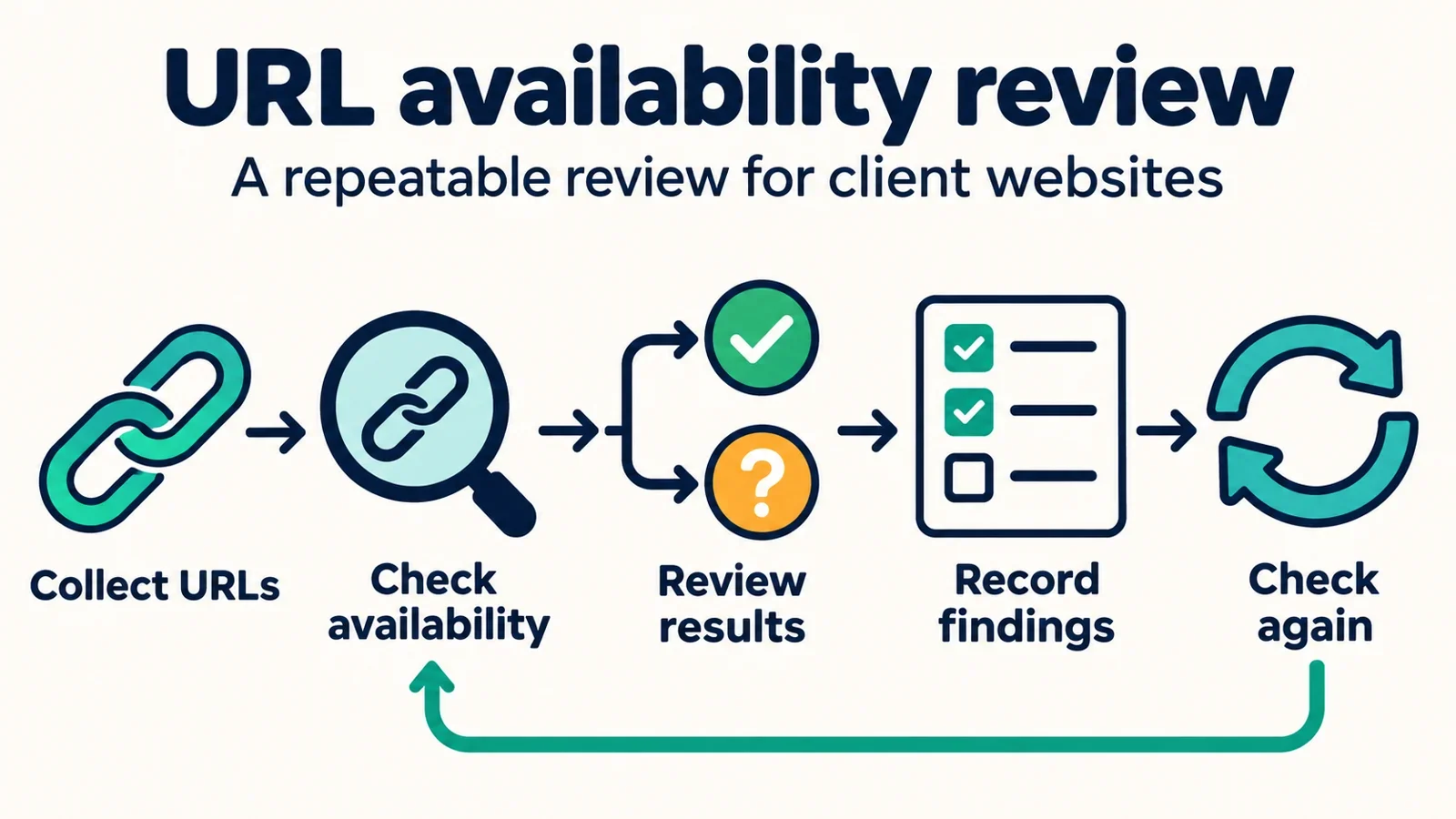
A repeatable URL availability review helps beginners observe whether a single public URL is reachable at one moment in time. Using sitecheckbench.top’s URL status check, you submit a public URL, run the check, and review the results bench showing URLs checked, HTTP 2xx / 3xx count, and “Need a review” count. Each observation includes its result, timestamp, and context before you decide whether further review or client reporting is needed.
This workflow is intentionally narrow. A successful request proves only that one request succeeded once. It does not guarantee future availability, nor does it verify content quality, SEO performance, security, rendering, or other page qualities. No account is required for local report exports, and sensitive details should be kept out of submitted URLs. Because inputs are untrusted, never assume a page is safe or always accessible based on a single check.
Before you begin: inputs and scope
Before running any availability check, gather the public URLs you want to include in your sample. Only public URLs are eligible for this tool. Staging environments, authenticated areas, internal pages, and URLs requiring login should be excluded. If a URL cannot be submitted publicly, record it as excluded with the reason rather than attempting to bypass access controls.
Define your scope clearly. Decide how many URLs you will check, which client site sections they represent, and whether you will check homepage URLs, key landing pages, or specific asset URLs. Record this scope before you begin so future reviews can use the same sample.
Understand what the check can and cannot observe. The URL status check accepts public URLs entered by the user and checks HTTP status while following the redirect path. It can show whether a request returned a 2xx or 3xx status at that moment, and it can show the redirect path taken. It cannot tell you whether the page content is correct, whether the site is secure, whether search engines can index the page, or whether visitors will have a good experience.
Do not include sensitive URLs, internal addresses, or credentials in your submission. Keep your input list limited to publicly accessible addresses that you are authorized to check.
Reader question: Which public URLs should be included in the availability sample, and how should exclusions such as staging or authenticated areas be recorded? You should include only public URLs you are authorized to check, and record excluded URLs such as staging or authenticated areas separately with their exclusion reason, not as failed observations.
Running the URL status check
To run a check, go to sitecheckbench.top and locate the URL status check input. Enter one public URL per submission. The tool requires the public URL as user input; there is no account creation needed to run the check or export a local report.
Submit the URL and initiate the check. The tool checks HTTP status while following the redirect path. After the check completes, the results bench displays immediately.
The results bench shows URLs checked, HTTP 2xx / 3xx count, and “Need a review” count. Each observation includes its result, timestamp, and context. A URL returning HTTP 2xx means the server responded successfully at that moment. A URL returning HTTP 3xx means the request was redirected. A URL marked “Need a review” indicates the result was unclear or requires further attention.
Do not interpret a missing result or an error as a pass. If the tool cannot complete the check, treat the observation as unresolved and record it appropriately.
Reader question: What exact input does the URL status check require from the user, and where is that entered on sitecheckbench.top? The user must enter a public URL into the URL status check input on sitecheckbench.top. The tool then checks HTTP status while following the redirect path.
Interpreting results and limits
An HTTP 2xx observation means the server returned a successful status code for that single request at that moment. An HTTP 3xx observation means the server returned a redirect status, and the tool followed the redirect path. The redirect path context is included with the observation so you can see where the request went.
These observations are moment-in-time snapshots. A successful result does not guarantee future availability. The site could go down minutes later, or the server could return a different status for a different request. Do not use this check as an uptime guarantee.
The URL status check does not verify content accuracy, SEO readiness, security configuration, or page rendering. It does not check whether the visible text is correct, whether meta tags are present, whether security headers are properly configured, or whether the page renders properly in a browser. Other checks such as SEO audit, performance check, security-header check, uptime check, responsive preview, and white-label report may address different qualities, but each has its own limits and is not part of this narrow availability review.
Treat each successful request as proof only that one request succeeded once. Do not extrapolate to all pages, all visitors, or all times.
Reader question: What does the results bench display immediately after a check runs, and what do the counts for URLs checked, HTTP 2xx/3xx and “Need a review” mean? The results bench displays URLs checked, the count of HTTP 2xx / 3xx responses, and the “Need a review” count. URLs checked is the total number of submissions processed. HTTP 2xx / 3xx is the number of successful or redirected responses observed. “Need a review” is the number of observations that were unclear or require further attention.
Recording observations for client work
For each observation, capture the result, timestamp, and context in an evidence ledger. The result should state whether the URL returned HTTP 2xx, HTTP 3xx, or was marked “Need a review.” The timestamp records when the check ran. The context should include the URL checked, the redirect path if any, and any notes about the observation conditions.
Mark unclear results as “unknown” rather than guessing. If the tool did not return a clear status, if the redirect path is incomplete, or if you cannot interpret the result, record it as unknown. Do not infer pass or fail from missing data.
Retain raw material for reproducibility. Keep the original submission details, the raw result output, and your ledger entries so that a client developer could reproduce the finding later. Every client audit conclusion should trace to an observation the client can inspect, with facts recorded rather than inferences, timestamps kept, and raw material preserved for reproducibility.
Your ledger should be organized so that another reviewer can see exactly what was checked, when, and what the result was. This supports transparency and repeatability in client work.
Reader question: What information should be captured for each observation so a client developer could reproduce the finding later? Capture the URL checked, the HTTP result or “Need a review” status, the timestamp, the redirect path context, and any observation notes. Keep raw material so the finding can be reproduced.
Preparing a client handoff report
When preparing a client handoff report, you may add optional brand or agency identity, an optional watermark, and an optional recommendation. These identity fields stay in the current tab during the workflow and are not uploaded to a server.
Preview your observations locally before exporting. Review the ledger entries, confirm timestamps and contexts are accurate, and ensure any unknown results are clearly marked. Do not export guesses as facts.
Export the report by printing or saving as PDF from the browser. No uploads or accounts are required for local report exports. The export contains only what is in the current tab, including optional identity fields if you added them.
Be aware that sample observations in exports reflect only the URLs and times you checked. They do not represent continuous monitoring or a comprehensive site audit. Label the report with the observation window and scope so the client understands its limits.
Reader question: What branding and recommendation fields are optional in the client report, and where do they stay during the workflow? Brand or agency name, watermark, and recommendation are optional fields that stay in the current tab during the workflow.
Repeating the workflow reliably
To repeat the workflow reliably, use the same URL sample and observation window as the previous review. This ensures comparability between before-and-after results. Keep records of previous inputs and observation dates so you can show what changed and what stayed the same.
If you change the scope, page sample, normalization rules, or scoring version between reviews, disclose the change before comparing results. Different samples or rules can produce different counts even when the underlying site availability has not changed. Without disclosure, comparisons may be misleading.
A repeatable workflow depends on consistent inputs. If you add or remove URLs, change the time of day you check, or alter how you classify results, note these changes in your ledger and client report.
Reader question: Why should a repeat availability review use the same URL sample and observation window as the previous review? Using the same sample and window makes before-and-after observations comparable. Different samples or windows can produce different results for reasons unrelated to actual availability changes.
Reader question: What must be disclosed if the scope, page sample, normalization rules or scoring version changes between repeated reviews? You must disclose any changes to scope, page sample, normalization rules, or scoring version before comparing results, so the client understands why counts may differ.