Contents
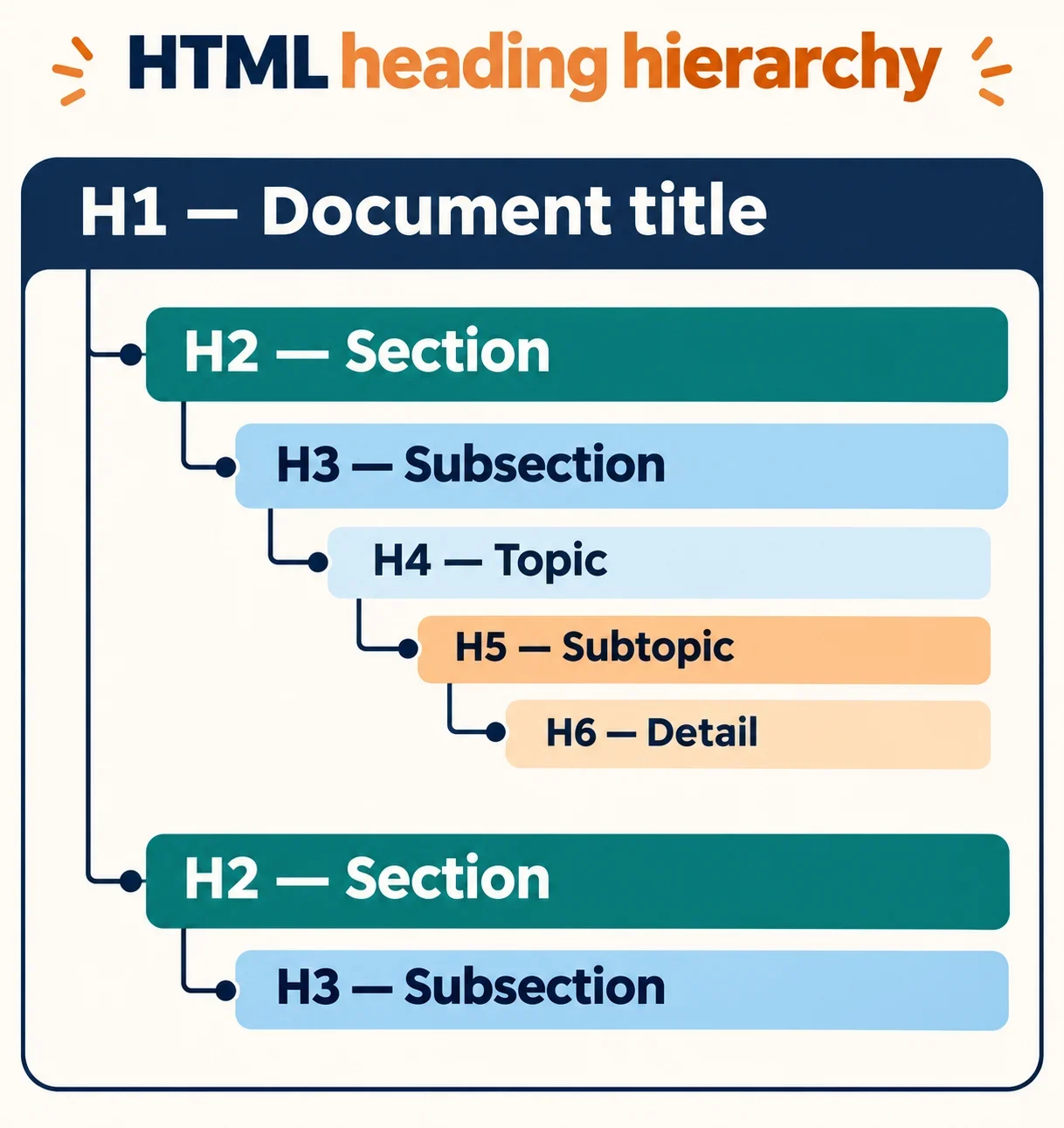
Heading structure plays a central role in page clarity. When readers or automated tools inspect returned HTML, heading levels create a visible outline that describes how content is organized. Problems such as skipped levels, missing top-level headings, or multiple H1 elements can make that outline harder to follow. This opening answer explains where heading review fits into a broader website observation workflow and what a beginner can practically check.
Site Check Bench describes its Search Readiness check as reviewing heading structure in returned HTML alongside titles, descriptions, canonicals and robots directives. A successful request is an observation at one moment and does not guarantee future availability. The heading check examines what the server returns; it does not reveal what happens after JavaScript runs in a browser, and it is not a substitute for browser-based load-time testing or security certification. Readers should treat heading results as one observation among others, such as URL status, response measurements, security headers, availability snapshots, viewport review and client handoff reports.
Why heading structure matters in a page review
Headings do more than break up text. They give a page a readable outline that helps visitors scan content quickly and understand how sections relate to one another. When heading levels are used consistently, readers can identify main topics and supporting details at a glance. Reviewers can apply the same logic when checking returned HTML: heading structure reveals whether the page’s visible outline matches its underlying markup.
This review belongs to a broader website observation workflow rather than a standalone diagnosis. Site Check Bench’s Search Readiness check reviews heading structure in returned HTML together with titles, descriptions, canonicals, and robots directives. Other observations in that workflow include URL status, response measurements, security headers, availability snapshots, viewport review, and client handoff reports. Each observation captures a condition at one moment; a successful request does not guarantee future availability.
Beginner reviewers should treat heading checks as one input among several. A clear heading hierarchy supports page clarity, but it does not by itself confirm performance, security, or future uptime. Keeping observations separate from recommendations helps reviewers avoid overstating what the data shows.
Common heading structure mistakes
Certain heading patterns repeatedly reduce page clarity because they break the expected reading order or make it difficult for readers to tell where one topic ends and another begins. Below are specific mistakes to watch for when reviewing returned HTML.
Skipping heading levels
A page that jumps directly from an H1 to an H3, or from an H2 to an H4, creates a gap in the outline. Readers and assistive tools often rely on sequential levels to understand how sections nest. A missing intermediate level can make a subsection appear disconnected from its parent or cause a reader to overlook content that logically belongs under an unseen heading.
Missing a top-level heading
Pages without an H1 leave readers without a clear primary label for the document. If the first heading starts at H2 or lower, the page lacks an obvious anchor that summarizes the main topic. This can make the structure feel flat or disorganized, especially on longer pages where multiple sections compete for attention.
Duplicate H1s
Using more than one H1 on a page can weaken the distinction between the page’s main subject and secondary sections. When several headings carry the same top-level weight, readers may struggle to identify which section represents the overall topic and which represents a supporting detail.
Empty headings
Heading elements with no visible text provide no structural value and can confuse readers who navigate by headings. An empty H2 or H3 may appear as a pause in the outline with no label, making it harder to scan the page efficiently.
Headings used only for visual styling
Applying heading tags to achieve a particular font size or weight, rather than to mark an actual section, misuses the heading hierarchy. Visual emphasis alone does not create a meaningful outline, and headings that do not introduce real content can distract from the page’s genuine structure.
Inconsistent heading use across similar pages
When one page uses an H1 for the page title and another uses an H2 for the same role, readers encounter different structural expectations across the site. Consistency does not require every page to look identical, but it does mean the top-level heading should play the same role wherever it appears.
Headings that do not describe their section
A heading should indicate what follows. Vague labels such as "Details," "More," or "Section" force readers to read the body text before understanding the topic. Clear, specific heading text supports faster scanning and better comprehension.
Document each issue by noting the heading level, its position in the returned HTML, and whether it introduces visible content. Avoid assuming that a visual heading style automatically means the underlying markup uses the matching heading tag.
Professional checklist for beginners
A beginner-friendly heading review starts with the server-returned HTML rather than what appears inside a browser’s rendered page. This distinction matters because heading structure can change after JavaScript runs, so the HTML snapshot is the common starting point for a repeatable observation.
Start by identifying every heading element, from H1 through H6, and list them in source order. The first meaningful check is whether a top-level H1 exists and whether it appears before any lower-level headings. If an H2 appears before an H1, the outline begins mid-structure, which can confuse readers and assistive tools relying on document order.
Check for skipped levels by comparing each heading to the previous one. Moving directly from H1 to H3, or from H2 to H5, creates a gap in the outline that breaks the expected nesting pattern. A safer pattern is to advance only one level at a time when entering a new subsection, such as H1 to H2, then H2 to H3.
Count the H1 elements on the page. More than one H1 can compete for top-level emphasis and make it harder to determine the page’s primary subject. A single H1, when present, usually anchors the document outline.
Examine heading text for clarity and independence. Each heading should describe its section without requiring surrounding sentences. Headings that repeat the same wording, rely on page context to make sense, or contain only generic phrases such as “Details” reduce scannability.
Verify that heading elements are used for actual section titles rather than visual styling. Bold paragraph text or styled links that look like headings but are not marked with heading tags will not appear in the outline and may mislead people who navigate by headings.
Record the heading sequence exactly as it appears in the returned HTML, including skipped levels, duplicate H1s, missing H1s, and non-heading elements used for visual emphasis. Note whether any headings appear empty or contain only whitespace.
Compare the heading order with the visible content order when possible. If the source order differs meaningfully from what a reader sees, document that discrepancy as an observation rather than assuming how assistive technology will interpret it.
Separate factual observations from improvement suggestions. For example, “The page uses H1, then H3, skipping H2” is an observation. “Add an H2 between them” is a possible next step that belongs outside the observation record.
When reviewing a page whose dynamic content may load after the initial HTML response, treat the heading snapshot as one moment in time. The heading structure observed in returned HTML does not guarantee the same structure after scripts execute or content updates.
Use this checklist alongside other page observations such as URL status, response measurements, security headers, and viewport checks. Each observation addresses a different aspect of the page, and heading structure should not be used to infer performance, security, or availability conclusions.
Separating observations from recommendations
A heading-structure check reports what is present or missing in the server-returned HTML. It can show whether a page lacks an H1, skips heading levels, repeats the same top-level heading, or places headings in an order that interrupts the document outline. These are observable facts captured at the moment of the request.
That observation does not explain why the headings appear that way. A missing H1 might reflect a publishing error, a template choice, or content loaded after the initial HTML response. Because the check reviews the returned HTML rather than executing every script or rendering every dynamic change, issues visible only after user interaction may not appear in the report.
Beginners can separate observations from recommendations by first recording exactly what the check found, then suggesting a review without declaring the cause. For example, instead of stating that a skipped heading level is causing accessibility failures, the reviewer can say that the returned HTML moves from H2 to H4 and recommend confirming the intended outline in the page template or content-management settings.
Practical wording helps keep the two categories distinct. Observation statements might include “the page contains one H1” or “heading levels jump from H2 to H5.” Recommendation statements might include “verify whether the missing intermediate levels were intentional” or “ask the publishing team to check template heading settings.” The first describes evidence; the second proposes a next step.
Reviewers should avoid turning heading observations into diagnoses of search performance, user-experience problems, or technical defects. A heading hierarchy can affect how readers and machines interpret page structure, but the check itself does not measure ranking impact, readability scores, or assistive-technology behavior. If the report shows irregular headings, the responsible next step is usually a manual review of the page source and publishing workflow rather than an immediate assumption about what is broken.
Documentation can support this separation by using columns or labels for “what was observed,” “where it was found,” and “suggested follow-up.” This format prevents a simple heading observation from being misread as a confirmed diagnosis. It also reminds stakeholders that the result reflects one successful request at one moment and does not guarantee how headings appear in every view, device, or future update.
What the heading check can and cannot confirm
Site Check Bench’s Search Readiness check reviews heading structure in the server-returned HTML together with titles, descriptions, canonicals and robots directives. A reader can therefore use it to observe whether H1, H2, H3 and lower-level headings appear in the initial HTML and how those levels are ordered. This observation is limited to what the server returns; headings added later by JavaScript are not visible to this HTML review.
The check can confirm whether a heading structure exists at the time of the request and can highlight surface issues such as skipped levels or missing top-level headings. It cannot confirm how assistive technology will announce the page, whether headings are meaningful to readers, or whether visual styling reinforces the hierarchy. It also cannot tell you whether the same structure will appear on future visits.
A successful request is an observation at one moment and does not guarantee future availability. Similarly, response measurements from Site Check Bench are response measurements, not Lighthouse scores, Core Web Vitals or a browser load-time test. Those measurements sit alongside heading observations but measure different things.
Security headers are another separate observation. A present header can still be misconfigured, so its presence is not a vulnerability scan or security certification. The heading check operates the same way: it reports what is present in returned HTML, not whether the page is accessible, compliant or optimised.
If embedding is blocked, users can try a public page in common viewport sizes with a direct link. That viewport preview is an independent check and does not extend what the heading review can confirm.
Beginners should document heading issues as observations about returned HTML rather than diagnoses of the live user experience. Useful notes include which heading levels appear, whether levels are skipped, whether more than one H1 is present, and whether the request returned HTML at all. Avoid statements about screen-reader behaviour, future page states or SEO outcomes unless a separate tool or check explicitly supports them.
For capabilities, limits and current tool behaviour, verify directly through official Site Check Bench pages before making decisions based on a report.