Contents
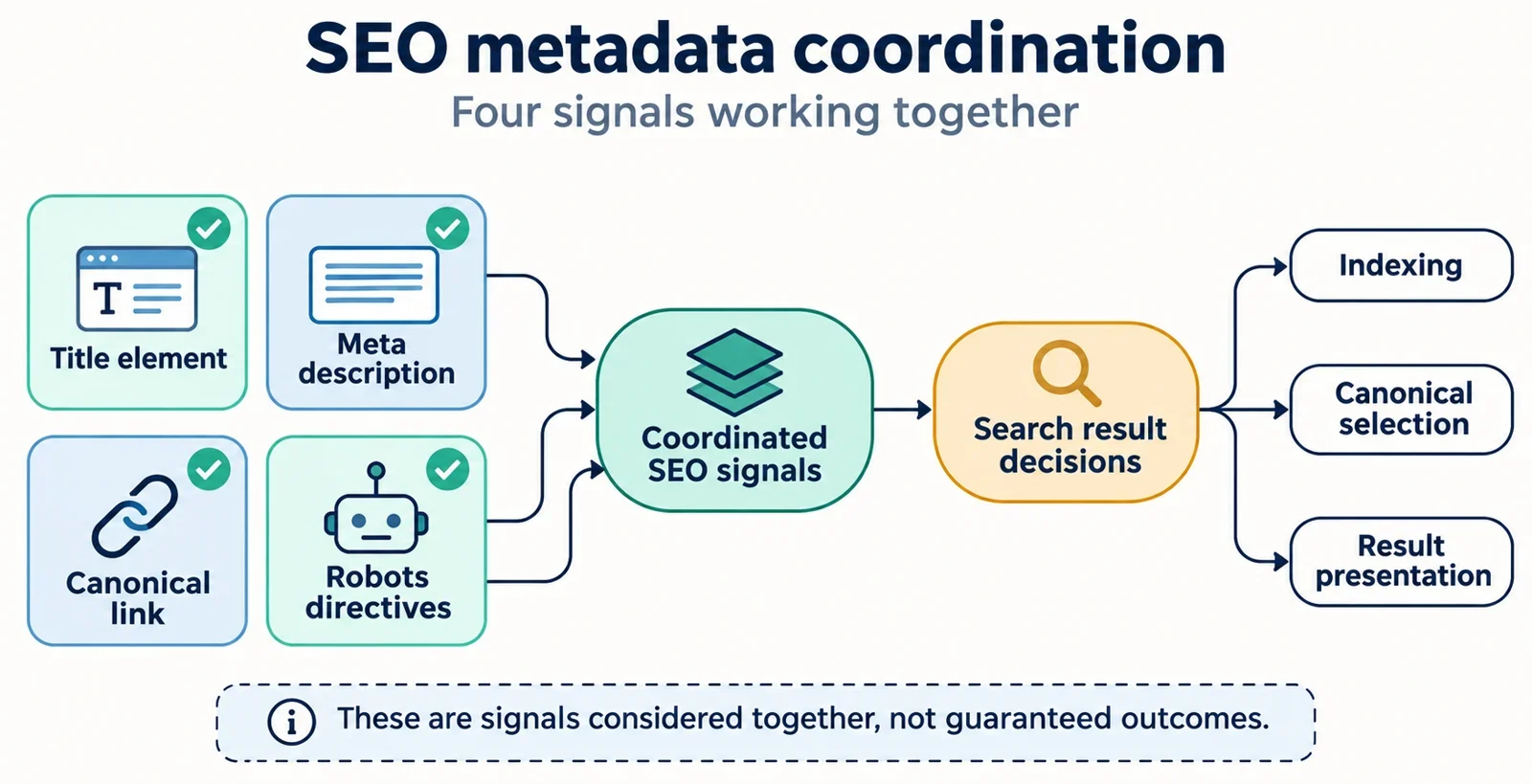
Title elements, meta descriptions, canonical links, and robots directives each send separate signals to search engines and other systems, but none of them is a guaranteed command. Treating any one tag as authoritative can lead to unexpected search results, conflicting duplicate-page handling, or pages remaining visible despite indexing directives. This guide is written as a confidence workflow for beginners who use sitecheckbench.top tools such as URL status check, SEO audit, responsive preview, and client report export. It explains what each mechanism does, where conflicts can appear, and how to turn tool observations into decisions without overstating what metadata can control.
The workflow emphasizes observing what a server returns, comparing metadata with visible page content, and labeling findings as snapshots rather than permanent performance or ranking verdicts. Readers will see how to run checks, interpret common conflicts, and prepare client-ready observations that note limits clearly. Every section preserves the outline headings so image positions remain valid for the published article.
Understand what each signal controls
Title elements, meta descriptions, canonical links, and robots directives work as separate signals, not commands that search engines must obey. A beginner confidence workflow benefits from understanding what each one is intended to do before running any tool check.
Title element
The title element names the document concisely and helps users understand what a page contains. It does not guarantee that Google will use it exactly as written in search results, nor does it guarantee ranking positions or AI citation behavior. Google may generate title links automatically from title elements, main visual titles, headings, open graph titles, prominent text, anchor text, and links pointing to the page. Replacing an index after changes can take days to weeks.
Meta description
A meta description is a candidate page summary. Google primarily creates snippets from visible page content and may use the meta description when it better explains the page to the searcher. Different queries can therefore show different snippets even for the same page. Google does not define a fixed character limit for titles or descriptions; display space varies by device, query, language, and presentation, so length checks are only a practical guide, not a rule.
Canonical link
A rel=canonical link expresses a preferred URL for duplicate or similar pages. It is not a redirect, and it is not a command that every system must follow. Google lists redirects as a strong canonical signal, rel=canonical annotations as strong, and sitemap inclusion as weak; these methods can stack to increase the chance that the preferred URL appears. If no canonical URL is specified, Google identifies which version is objectively best to show users in Search. Google also recommends including a self-referential canonical on the canonical page itself.
Robots directives
Robots directives request supported indexing or preview behavior only when a crawler can access and process them. They do not guarantee compliance by every crawler, nor do they guarantee removal of a blocked URL. JavaScript content, robots.txt handling, and search index status are outside certain readiness checks, so tool results should be treated as observations rather than proof of indexing behavior.
Because these mechanisms overlap and sometimes conflict, the safest habit is to record what each signal says, compare it with the page’s visible content, and treat any mismatch as something to verify rather than an error to fix immediately.
Run checks through the available tools
This section maps the inputs, outputs, and decisions for each available sitecheckbench.top check so beginners can work through a page without confusing tool evidence with ranking guarantees. Start with one page URL at a time and keep the same URL across checks when comparing results.
URL status check
Enter a full page URL and submit the request. The tool returns an availability snapshot drawn from up to 48 snapshots retained for seven days. It observes response latency, downloaded body size, and caching headers from the WordPress server. These observations are not Lighthouse scores, Core Web Vitals, or browser load-time tests. A single successful HTTP request only confirms availability at that moment; it does not provide background polling or an SLA uptime percentage. If the page fails, treat it as a snapshot-level observation, not proof that the page is always down.
SEO audit
Provide the page URL so the audit can inspect server-returned HTML. The tool surfaces fields corresponding to title elements, meta descriptions, canonical links, and robots directives found in that HTML. These fields help you see what signals are present, not whether search engines will follow them. Use the audit output to list missing or duplicated elements, then decide whether to edit the page, verify another version, or leave the current configuration unchanged.
Performance check
Run a performance check against the same URL to gather server-side timing and size information. The returned data concerns response latency, downloaded body size, and caching headers from the WordPress server. Do not interpret these values as Lighthouse scores or Core Web Vitals. If latency or body size appears high, investigate server response and asset delivery rather than assuming a metadata problem.
Security header check
Input the page URL to inspect security headers and selected directives. The tool reports which headers are present and their configured values. A present header can still be misconfigured, and this check is not a vulnerability scan or certification. Use the output as a configuration prompt for a developer or hosting administrator, not as proof of security status.
Responsive preview
Enter the URL and choose an available viewport size. The preview shows how the page renders at that size, which is useful for checking titles, descriptions, and visible content in different layouts. If embedding is blocked, the preview may not display the page at all; treat a missing preview as an embedding restriction rather than evidence that the page itself is broken. Compare results across viewport sizes before deciding whether visible metadata needs adjustment.
White-label report
Before exporting, complete any available branding fields so the report reflects your client-facing presentation rather than generic defaults. Branding options depend on what the export tool currently offers; verify them in the interface before finalizing. After generating the report, review every observation against live checks. Sample results are labeled separately because they are learning examples, not live evidence for a client’s site. Running live checks before client reports prevents you from presenting sample data as if it belonged to the customer.
Audit titles and descriptions as inputs
A title element and a meta description are page-level suggestions, not binding commands. Inspecting them correctly means comparing what is in the HTML with what visitors actually see, then interpreting any difference as evidence for further checks rather than an automatic error.
Inspecting the title element
The title element names the document concisely and appears in the page’s HTML head. Because search engines choose titles from multiple sources, the text in the title element may not appear verbatim in search results. Google can draw from headings, prominent visible text, og:title, anchor text, and links pointing to the page. Rewritten titles are therefore expected behavior and should not be treated as a technical fault by themselves.
A practical check begins by viewing the page source or using an SEO audit tool that returns the HTML metadata fields. Compare the title element text with the main visible heading on the page. If they differ meaningfully, note both versions and consider whether the visible content better reflects what the page is about. Differences alone do not prove a problem; they show where search engines have additional material to choose from.
Inspecting the meta description
A meta description is a candidate summary that search engines may use when it better explains the page than the surrounding content. Google primarily creates snippets from page content, and different search queries can produce different snippets from the same page. There is no fixed character limit for descriptions; visible space varies by device, query, language, and presentation.
When auditing, extract the meta description from the server-returned HTML and read the visible page content. Ask whether the description matches the page’s primary purpose, but avoid concluding that a missing or generic description is automatically harmful. The absence of a description simply means the search engine will rely more heavily on visible content.
Interpreting rewrites without treating them as errors
Search engines can change displayed titles and descriptions over time, and recrawling may take days to weeks. A changed search result title does not mean the title element was removed or misconfigured. It means the engine selected a different source for that particular impression.
Record the observed HTML, the visible page text, and any sampled search result variation. Treat the metadata as one input among several. If the goal is consistency, align titles, headings, and visible content so the signals reinforce each other; if a search result still varies, that variation is expected behavior, not proof of a broken tag.
Questions to guide the check
- Does the title element appear in the HTML head, and does it match the main visible heading?
- Is there a meta description, and does it summarize the visible content rather than repeat keywords?
- When a search result title differs from the title element, what other visible text or links might the search engine have used?
- What limits should accompany an observation based on a single page inspection or sample result?
Audit canonicals and robots as coordination signals
A canonical link tells search systems which URL you prefer when several pages contain similar or duplicate content. It is not a redirect, and it is not an instruction that every crawler must obey. Google describes canonical signals as methods that can stack: redirects are listed as strong canonical signals, rel=canonical link annotations are strong, and sitemap inclusion is weak. Because multiple signals can combine, a missing or conflicting canonical may not prevent a search system from choosing a different URL on its own. If no canonical URL is specified, Google identifies which version it considers objectively best for users in Search results.
Google recommends including a rel=canonical link on the canonical page itself, known as a self-referential canonical. This does not guarantee that search engines will select that URL, but it makes the preference explicit on the page intended to be primary. When auditing, check whether each page likely intended as canonical carries its own self-referential link, whether duplicate pages point to that same preferred URL, and whether any page points to a canonical that itself canonicalizes elsewhere.
Robots directives work differently. They request indexing or preview behavior only when a crawler can access and process them. They do not guarantee compliance by every crawler, nor do they guarantee removal of a blocked URL. A noindex directive requests that a page not appear in search results, but if crawlers cannot reach the page or ignore the directive, the page may still surface through other signals. Directives in HTML meta tags and X-Robots-Tag headers should be checked alongside canonicals because the two can conflict. For example, a page may canonicalize to another URL while also carrying noindex on itself. Such a combination deserves investigation rather than immediate correction, because the preferred target and the indexing request point in different directions.
Canonical preference and robots directives should be interpreted as coordination signals, not commands. A page can have a clear canonical and still appear under a different URL in search results. A page can carry noindex and still be discovered through links or other indexing pathways. When results conflict, the next step is to inspect server-returned HTML for the actual tags and headers, confirm which signals are present, and treat the observation as a question to verify rather than a defect to report automatically.
Decide what to report and what to verify next
An audit output is an observation, not a verdict. Before sharing results with a client, separate what the tool actually measured from what it suggests could be worth checking. A successful HTTP request only confirms that the server responded at that moment; it does not prove ongoing availability, predictable performance, or that search engines will display the page as intended. Sample results are useful for learning how fields appear, but they should not replace live checks before client-facing reports.
Turn tool output into reportable observations
Start with the factual output: status code, response latency, downloaded body size, caching headers, security-header presence, canonical link, meta description text, title element, robots directives, and viewport preview behavior. Describe each result exactly as returned, including any missing values. Avoid converting a single availability snapshot into an uptime percentage or service-level claim. The snapshot retains up to 48 snapshots for seven days, but it does not provide background polling or an SLA guarantee.
When a security header appears, report its presence and selected directives as configuration information. A present header can still be misconfigured, and this is not a vulnerability scan or certification. Likewise, do not present server response latency or body size as Lighthouse scores, Core Web Vitals, or browser load-time tests.
Sample results versus live checks
Sample results are labeled because they illustrate output structure and possible values without representing a current condition of any specific live site. They help beginners recognize where titles, descriptions, canonicals, and robots directives appear in results. Before exporting a client report, run a live check against the actual target URL so the report reflects the current server response rather than a static example.
Prepare client-ready observations with limits
Each client observation should include what was checked, what was returned, what cannot be concluded, and what verification should follow. For example, if a page returns a successful status and contains a self-referential canonical, report that the canonical link was present in the inspected HTML. Do not report that Google will necessarily use that URL, because canonical preference is only a signal and methods such as redirects and sitemap inclusion can stack to influence which URL appears.
If a search result title differs from the page title element, describe the difference as an observed mismatch, not an error. Search systems may generate title links from headings, prominent text, anchor text, linked content, and other page sources, and recrawling can take days to weeks. Similarly, a meta description may appear in some searches and not others because Google primarily builds snippets from page content and uses the description when it better explains the page.
Questions to answer before finalizing a report
- Did the check run against the live URL or a labeled sample result?
- Which fields were present, absent, or unexpected in the server-returned HTML?
- What does a single successful response prove, and what does it not prove?
- Are there conflicting canonical, robots, or title signals that need further verification?
- What follow-up checks would make the observation more reliable for the client?