Contents
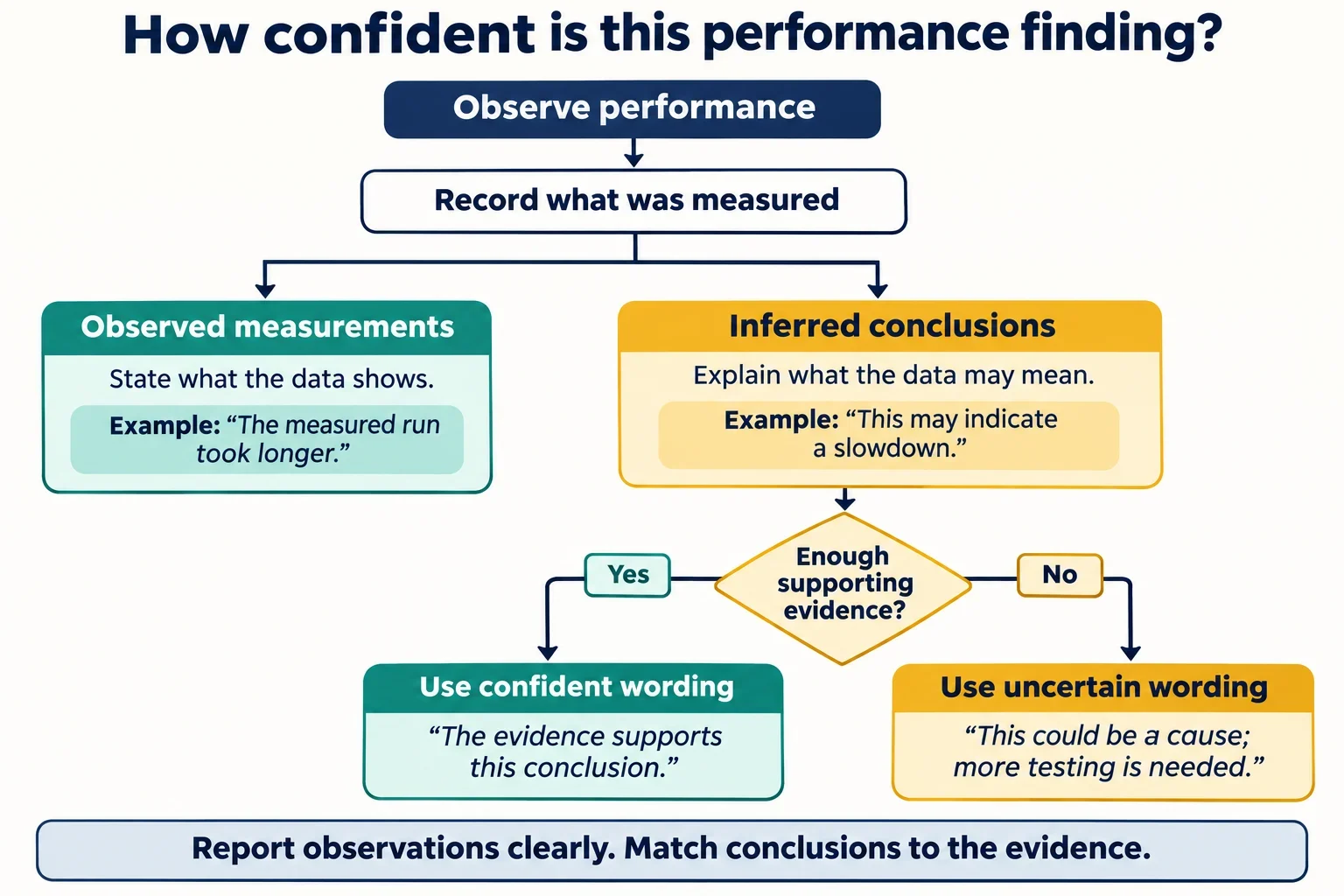
Performance tools can show what a site did at one moment, but they cannot promise what it will do later. If a report turns a single HTTP 2xx response into a guarantee of future availability, or describes server response size as a Lighthouse score, the reader receives an overstated finding. This guide helps beginners communicate performance findings from sitecheckbench.top accurately, using a design-system handoff approach: clear inputs, clear outputs, labeled artifacts, and wording that matches the precision of what was actually measured. Readers will learn what each enabled tool accepts, what it returns, how to separate observations from conclusions, how labeling and exports keep limits attached to findings, and how to choose certain versus uncertain language without overstating or understating results.
User inputs and tool outputs for performance findings
Before writing report language, reviewers should know what each enabled tool accepts as input and what it returns. This prevents conclusions from exceeding the measurements available.
url-status-check
The reviewer enters a URL and runs a check to observe HTTP status and redirect paths for one or more URLs. A successful request is an observation at one moment and does not guarantee future availability.
seo-audit
The tool reviews titles, descriptions, canonicals, robots directives and heading structure in returned HTML for each page. JavaScript content, robots.txt and search index status are outside this check.
performance-check
The tool observes response latency, downloaded body size and caching headers from the WordPress server. These are response measurements, not Lighthouse scores, Core Web Vitals or a browser load-time test.
security-header-check
The tool inspects security headers and selected directives to support an informed configuration decision. A present header can still be misconfigured. This is not a vulnerability scan or security certification.
uptime-check
Up to 48 snapshots are retained for seven days. No background polling or SLA uptime percentage is provided.
responsive-preview
Reviewers enter a URL to review layout in common viewport sizes, with a new-tab link when embedding is blocked; large viewports scroll within the bench while the page stays the same width.
white-label-report
Report identity accepts brand or agency name, optional watermark, and optional recommendation; branding and recommendations stay in the tab. Users can print or save as PDF from the browser, or take data into their own workflow; sample observations are labeled in every export; no report service, uploads or account required.
Server access requirement
Server checks require an authorized WordPress session. Sample results and report exports work locally. Each observation includes its result, timestamp and context.
Distinguishing observations from conclusions
An observation is what the tool actually saw at check time. A conclusion is what the reviewer infers from that observation. Keeping them separate prevents overstated performance claims.
Start every finding with the measured fact. For example, after url-status-check returns HTTP 2xx for a URL, the observation is that the request succeeded at that moment. The conclusion that the site is always available is not supported. Fact-2 states directly that a successful request does not guarantee future availability.
The same separation applies across tools. In seo-audit, the tool observes titles, descriptions, canonicals, robots directives and heading structure in returned HTML. It does not observe JavaScript content, robots.txt or search index status. Reporting that a page is indexed or that JavaScript-rendered content is optimized would be a conclusion beyond the tool’s output.
In performance-check, response latency, downloaded body size and caching headers are response measurements from the WordPress server. They are not Lighthouse scores, Core Web Vitals, or a browser load-time test. Describing them as user-experience scores would overstate what was measured.
In security-header-check, the presence of a header supports an informed configuration decision, but a present header can still be misconfigured. This is not a vulnerability scan or security certification. Reporting that a site is "secure" because headers are present overstates the finding.
Each observation includes its result, timestamp and context. Reviewers should preserve that context when moving an observation into a report, so readers know the conditions under which it was captured.
Design-system handoff artifacts for performance reporting
A design-system handoff works best when identity, labeling, and export behavior travel with the findings. The following artifacts help keep limits attached to results as they move from reviewer to client or stakeholder.
Report identity fields
White-label-report accepts brand or agency name, optional watermark, and optional recommendation. Branding and recommendations stay in the tab. Reviewers should complete these fields before export so the report carries clear ownership and any intended recommendation.
Export behavior
Users can print or save as PDF from the browser, or take data into their own workflow. Sample observations are labeled in every export. No report service, uploads or account is required. Because exports work locally, reviewers control when and how findings leave the environment.
Sample labeling
Every export labels sample observations. This matters because a sample observation is not a representative average or a continuous monitoring result. Labeling tells the reader that the finding applies to the checked moment and sampled conditions only.
Context fields
Each observation includes its result, timestamp and context. These fields should remain visible in the report so the limit is attached to the finding rather than separated from it.
Beginner confidence workflow: deciding what to communicate next
This workflow helps beginners turn moment-in-time observations into a plan without implying guarantees beyond what the tools measure.
Step 1: Choose the check area
Pick the tool that matches the question. Use url-status-check for HTTP status and redirect paths, seo-audit for returned HTML signals, performance-check for server response measurements, security-header-check for header configuration, uptime-check for snapshots, and responsive-preview for viewport layout review.
Step 2: Run the check with required access
Server checks require an authorized WordPress session. Enter the URL and run the check. Confirm the tool completed before recording results.
Step 3: Record the observation exactly
Capture the result, timestamp and context for each observation. Do not paraphrase a measurement into a broader performance claim at this stage.
Step 4: Separate observation from conclusion
Ask what the tool actually measured and what it explicitly does not measure. For example, performance-check response measurements are not Lighthouse scores or Core Web Vitals. Security-header-check is not a vulnerability scan.
Step 5: Prepare the client report from any check area
Reviewers can prepare a client report from any check area, and the site navigation links each guide to turning observations into a plan. Use white-label-report to add brand or agency name, optional watermark, and optional recommendation.
Step 6: Export with labels intact
Print or save as PDF from the browser, or take data into your own workflow. Confirm sample observations are labeled in every export so limits travel with findings.
Step 7: Decide next communication
If the observation supports a configuration decision, recommend verification rather than certification. If it suggests a possible issue, frame it as a finding to investigate, not a proven defect.
Communicating uncertainty without overstating or understating
The Microsoft HAX Toolkit principle applied here is to match words’ precision to the precision of system performance. The system is probabilistic and may make mistakes through intentional use of uncertainty in language.
When to use certain language
Use more certain language to communicate high system performance. For example, if the check confirms an HTTP 2xx response and redirect path at a specific time, the reviewer can state that the request succeeded at that moment. Certainty should stay bounded by the timestamp and context of the observation.
When to use uncertain language
Use less certain language to communicate that the system may make mistakes. Avoid phrases that imply continuous availability, guaranteed speed, or certified security. Instead of saying "the site is fast," say "the server response latency observed at check time was X." Instead of saying "the site is secure," say "the inspected security headers were present at check time; a present header can still be misconfigured."
Avoiding meaningless uncertainty
Uncertain language is so ambiguous that it becomes meaningless when language use treats all instances of system uncertainty as if they were the same. Reviewers should specify what is uncertain and why. Is the uncertainty about future availability? About JavaScript-rendered content outside the seo-audit scope? About a header that is present but possibly misconfigured? Naming the limit makes the language useful.
Getting precision information
Collaborate with an AI/ML practitioner to get information about the level of precision the system can achieve and its confidence. This helps reviewers choose wording that matches actual system performance rather than guessing.
Practical wording examples
- Overstated: "The site is always available because the last check returned 2xx."
- Accurate: "The URL returned HTTP 2xx at the check timestamp; this does not guarantee future availability."
- Overstated: "Performance score is good based on response size."
- Accurate: "The tool observed response latency, downloaded body size and caching headers from the WordPress server; these are not Lighthouse scores or Core Web Vitals."
- Overstated: "Security headers prove the site is secure."
- Accurate: "The tool inspected security headers and selected directives to support an informed configuration decision; this is not a vulnerability scan or security certification."