Contents
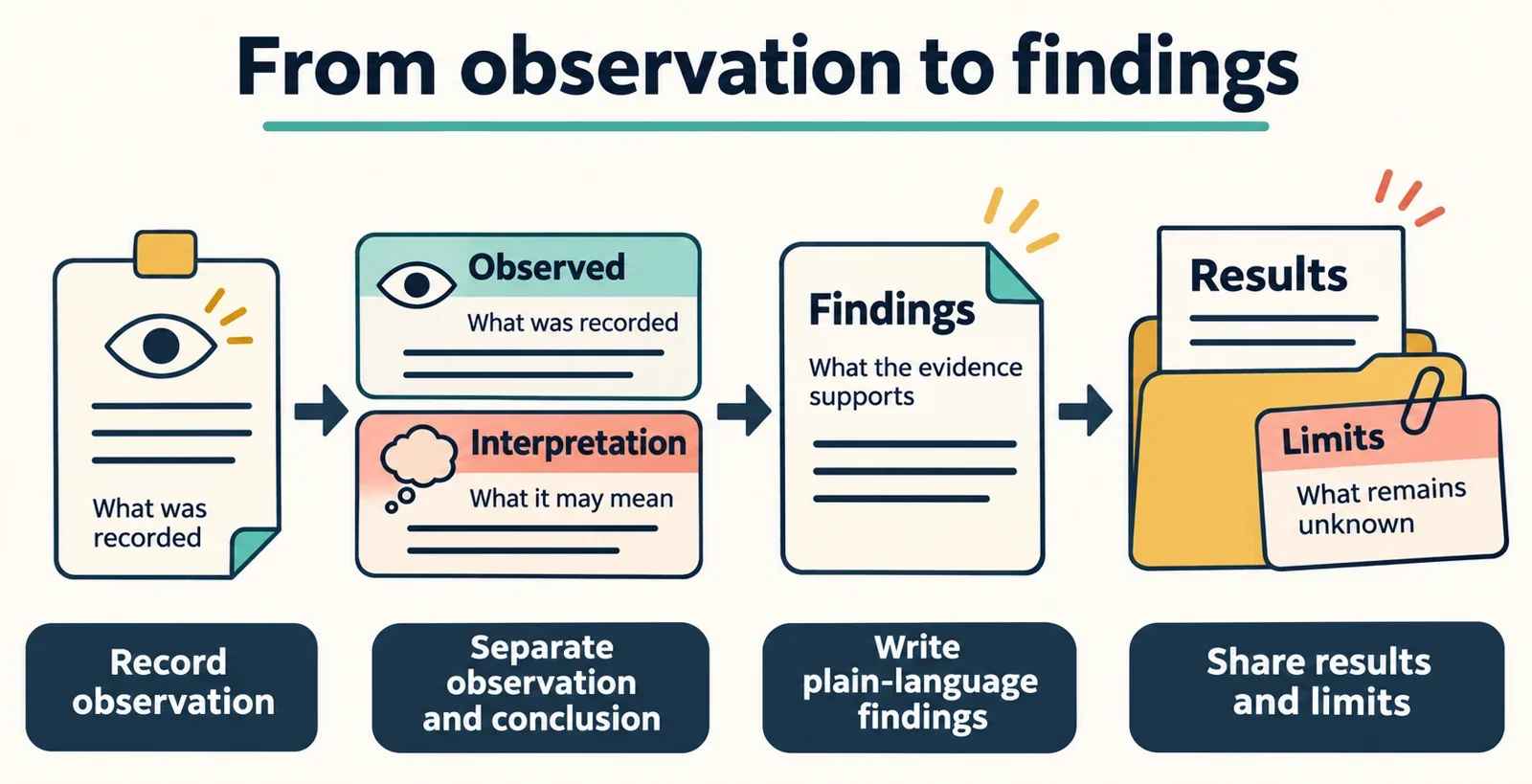
Performance reporting starts with an honest observation, not a conclusion. When you use sitecheckbench.top to measure response latency, downloaded body size, and caching headers, the tool gives you a single moment of data. That data is useful, but it is limited. It does not measure Core Web Vitals, produce Lighthouse scores, test how pages load in a browser, or scan for security vulnerabilities.
This guide gives beginners a practical confidence workflow for communicating findings without overstating what the tool observed. It covers four steps: running an observation, separating observation from conclusion, writing the report, and handing results to a client or team. You will learn what to record before a check, how to word latency findings carefully, and how to use branding and recommendation fields responsibly. Where facts about tool behavior are missing, the guide tells you what to verify before writing.
Run a performance observation
Before starting a performance observation on sitecheckbench.top, record the exact URL you plan to check and the context of the test. Context includes the date and time of the observation, the network conditions you were under if relevant, and any notes about the page you tested. Without this information, a later reader cannot tell whether the result applies to their situation or to a different moment in time.
When you run the observation, the tool returns response measurements that include the result, timestamp, and context for response latency, downloaded body size, and caching headers. Treat each of these as a data point about one specific request, not as a general score for the website. A response latency measurement tells you how long one response took at that moment. A downloaded body size measurement tells you how large one response body was. Caching headers show whether the server returned instructions about storing or reusing the response.
The immediate decision after running a check is whether the observation is complete enough to share. If you only have a single measurement, decide whether to run additional checks at different times or to clearly label the result as a single-moment observation. Do not assume that one fast response means the site is always fast, or that one slow response means the site is slow overall.
If you need more detail about what URL-status checks, SEO audits, security-header checks, uptime checks, responsive previews, or white-label reports can measure, check sitecheckbench.top directly before assuming any capability exists.
Reader question: What exact URL and context should I record before running a performance check?
Record the full URL, including protocol and path, plus the timestamp and any relevant test context such as network conditions or the specific page being tested.
Reader question: Which response measurements does the tool return, and which metrics are outside its scope?
The tool returns response latency, downloaded body size, and caching headers with result, timestamp, and context. It does not return Lighthouse scores, Core Web Vitals, browser load-time tests, or security vulnerability results.
Separate observation from conclusion
Describing what the tool observed requires careful wording. Say "the response latency was X milliseconds at the time of the check" rather than "the site loads in X milliseconds." The first statement describes one observed response; the second implies a general performance characteristic that the check cannot support.
These are response measurements, not Lighthouse scores, Core Web Vitals, or a browser load-time test. Avoid wording that connects your observation to any of those metrics. For example, do not say "the page has good Core Web Vitals" based on a single response latency measurement. Do not say "Lighthouse would score this highly" or "users will experience fast loading."
Caching headers require similar caution. A present header can still be misconfigured. The presence of a caching header is an observation about what the server returned; it is not a statement that caching is working correctly, and it is not a vulnerability scan or security certification. If you mention headers, describe which headers appeared and what values they had, without concluding that the site is secure or properly optimized.
Overly certain language can lead readers to form over-inflated expectations about system performance. Microsoft HAX guidance warns against presenting system behavior as more certain than the evidence supports. Use phrases such as "at the time of the check," "for this single response," and "the tool observed" to keep your claims tied to the measurement.
AI Open Guidelines recommend translating confidence values into concepts people already understand and knowing what confidence values mean before presenting them. They also advise explaining the benefit, not the technology, using simple, direct language and avoiding technical or statistical jargon. If you want to say how confident you are in a finding, express that confidence in plain terms tied to the observation, such as "this reflects one response at one moment; results may differ at other times."
Reader question: How should I word a latency finding so it does not imply Core Web Vitals or Lighthouse scores?
Use wording such as "The observed response latency was X milliseconds at the time of the check." Avoid mentioning Core Web Vitals, Lighthouse, or general page-load speed.
Reader question: What does the presence of a caching header mean?
It means the server returned that header in that response. It does not mean caching is correctly configured, and it is not a security certification or vulnerability result.
Communicate findings in a report
When you write a report, include only what you can support from your observations. If no check has run yet, the report should state that clearly. Include the URL that is planned for checking, the date when the check is scheduled or expected, and what measurements will be collected. Do not invent results or fill empty fields with assumptions.
Report identity fields include brand or agency name, optional watermark, and optional recommendation. Branding and recommendations stay in the tab, which means they are presentation elements, not measurement results. Use the brand field to identify who produced the report. Use the watermark if you want visual identification. Use the recommendation field only for guidance that follows from your actual observations, not for claims the check cannot support.
For example, if your observation showed high response latency on one check, a supported recommendation might be "run additional checks at different times to see whether this pattern repeats." An unsupported recommendation would be "upgrade your hosting" or "enable caching," because the single observation does not diagnose the cause.
Follow plain-language interface-writing guidance: use clear language, short sentences, one idea per sentence, and put important words first. GOV.UK guidance supports this approach for helping readers understand information quickly. AI Open Guidelines add that you should explain the benefit, not the technology, and avoid technical or statistical jargon. Instead of writing about response-time distributions, write "this check measured one response; other responses may be faster or slower."
Reader question: What should a report include when no check has run yet?
Include the planned URL, the expected check date or timing, and the measurements you intend to collect. State clearly that no observation has been made.
Reader question: How can branding and recommendation fields be used without adding unsupported claims?
Use branding for identity only. Use recommendations for next steps that follow from your observations, such as running more checks, rather than diagnosing causes or prescribing fixes the tool cannot verify.
Hand off to a client or team
Handoff language should make limits visible, not hidden. State clearly that one response measurement is a single-moment observation. Say what was checked, when it was checked, and what remains unchecked. For example: "This report reflects one response measurement taken on [date] at [time]. It does not cover JavaScript content, robots.txt, search index status, browser load behavior, or security vulnerabilities."
The search readiness check covers server-returned HTML only; JavaScript content, robots.txt, and search index status are outside this check. If your report mentions search-related findings, limit them to what the server-returned HTML showed. Do not imply that the page is indexed, that search engines can crawl it, or that JavaScript-rendered content is visible.
Give the recipient clear next steps. Suggest running checks at different times, testing multiple pages, or comparing observations before and after a change. Explain that results may vary and that a single observation cannot establish a trend. If the client or team needs more comprehensive testing, direct them to check sitecheckbench.top for available check types rather than promising capabilities.
End the handoff with a summary of what is known and what is not known. Known: the observed latency, body size, and caching headers for one response at one time. Unknown: whether the result repeats, how the page performs in a browser, whether search engines can access JavaScript content, and whether any security issues exist. This structure helps recipients make decisions without overestimating what the evidence shows.
Reader question: What handoff language clarifies that one response measurement is a single-moment observation?
Use phrases such as "single-moment observation," "at the time of the check," and "one response." Explicitly list what remains unchecked, such as browser load behavior, search index status, and security scanning.