Article Contents
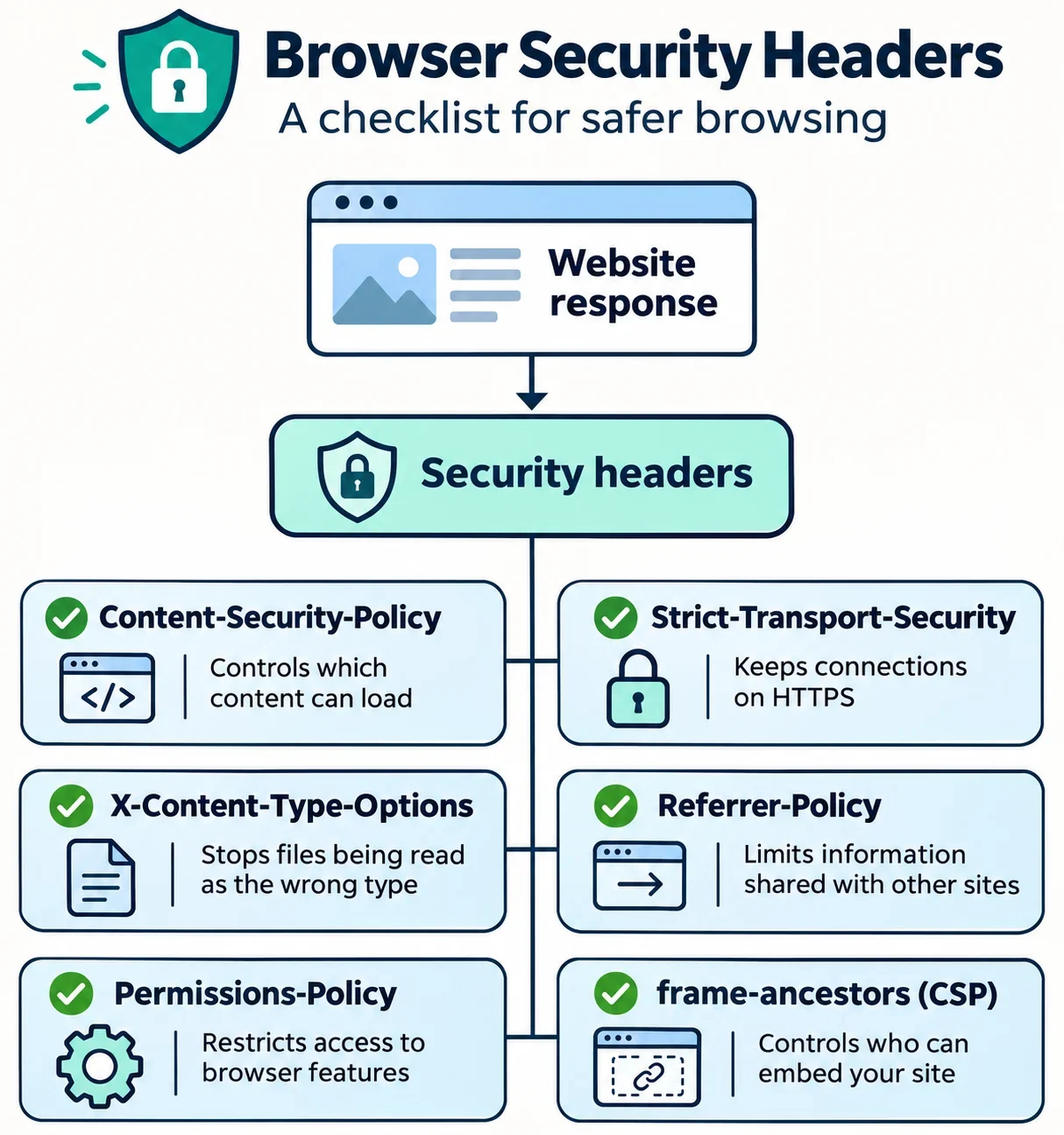
Browser security headers are instructions that a website sends to visitors’ browsers, telling them how to handle connections, content, and referrer information. For non-technical clients, these headers can sound like obscure code, yet they directly affect how a site protects visitors, enforces encrypted connections, and limits risky content behaviors. Explaining them well means translating each observation into plain business terms, showing what a missing or misconfigured header could mean for the brand, and avoiding language that sounds like a guaranteed security certification.
This guide outlines a repeatable client-communication workflow. It helps professionals present header checks in branded reports, keep tone and formatting consistent across hand-offs, and move from a live header observation to an informed discussion without overwhelming the client. Because a header being present does not mean it is correctly configured, and a header check is not a vulnerability scan, the workflow emphasizes honest framing throughout.
Translating Technical Headers into Client Value
Start by describing security headers as browser instructions rather than server settings. A visitor’s browser reads these instructions when it loads a page, and follows them to enforce protective behavior. Framing headers this way removes the impression that the client must understand HTTP syntax to grasp the business relevance.
For example, Strict-Transport-Security tells browsers to use only encrypted connections for the site. In client language, this means the site asks browsers to avoid unencrypted fallback connections, reducing exposure to protocol downgrade risks. The business point is straightforward: visitors stay on a protected channel rather than accidentally connecting through an insecure route.
Content-Security-Policy controls which content sources a page may load, such as scripts, images, or styles. Explain it as a permission list for the browser: only approved sources may run or display content, which helps limit the impact of unwanted or malicious code. When discussing rollout, avoid presenting it as an instant fix. Instead, describe it as a staged adjustment that can start in a monitoring mode, where violations are reported without blocking content, so the client can see potential issues before enforcement begins.
X-Content-Type-Options blocks browsers from guessing a file’s type when the server’s declared type is unclear. Tell the client this forces the browser to trust the declared content type instead of performing its own guesswork, reducing the chance that a disguised file is treated as executable code. Keep the explanation short and connect it to the broader goal of reducing unexpected browser behavior.
Referrer-Policy controls how much referring-page information travels with outgoing requests. Explain it as a privacy dial for outbound links: the site can decide whether to send the full page address, only the domain, or no referrer data at all. This is relevant when the client cares about visitor privacy or wants to limit information shared with third-party destinations.
Throughout, tie each header to a business outcome such as protecting visitor trust, preserving brand reputation, or reducing the risk of embarrassing content incidents. Avoid promising that any header prevents all attacks, because headers address specific browser behaviors rather than providing complete site security.
Establishing Brand Consistency in Client Hand-offs
Brand consistency means the client receives the same visual structure, tone, and level of detail whether the report comes from one team member or another. A standard audit template prevents clients from comparing hand-offs and finding conflicting formats, which can erode confidence in the review process.
Use fixed sections in every report:
- Header observed
- Current state
- Plain-language meaning
- Possible business impact
- Recommended next step
When a header is missing or misconfigured, place the recommendation in the same section as the observation rather than sending the client to a separate technical appendix. This keeps the conversation guided and focused on one topic at a time.
Separate observed header states from security certifications explicitly. A present header can still be misconfigured, and checks do not constitute a vulnerability scan or security certification. Include a short “What this review covers” note in the introduction or as a dedicated box. Use neutral labels such as “header detected” or “header not detected” instead of “secure” or “insecure,” because presence alone does not confirm correct operation.
Apply brand colors, fonts, and logo placement consistently, but do not let design imply endorsement or guaranteed protection. A clean layout supports credibility, while overclaiming language can damage it if a later review finds additional issues. Include a short legend explaining status labels so clients do not need to ask what each icon or color means.
If multiple headers need attention, rank them by likely relevance to the client’s stated concerns rather than by technical severity alone. For example, a client focused on customer data handling may care more about Referrer-Policy than a header related to content-type handling.
Before sending any hand-off, verify that the report’s status labels match the actual check results and that no certification language appears unless a separate accredited assessment has been completed. Ask whether each recommendation is written in the client’s business context, not only in technical terms.
Structuring the Beginner Confidence Workflow
A beginner-friendly workflow follows five repeatable steps that move from observation to client discussion without overstating what a header check can prove.
First, run the live header check on the client’s domain and record exactly which headers are present and which are absent. Treat raw header values as internal notes unless the client specifically asks for them; the conversation should focus on meaning rather than syntax.
Second, translate each observation into one plain-language sentence and one business-relevant sentence. If Strict-Transport-Security is missing, explain that browsers are not instructed to require encrypted connections, which could allow visitors to reach the site through an unprotected route. If X-Content-Type-Options is missing, explain that browsers may perform MIME-type sniffing instead of honoring the declared content type. If Referrer-Policy is missing, explain that the site may share more referrer information with destination sites than necessary. Do not add definitions from outside the observed facts.
Third, draft the report using the branded template. Fill in the header name, observed state, plain-language explanation, possible impact, and next step. Include a brief note that header presence does not equal correct configuration and that this review is not a security certification. A present header can still be misconfigured.
Fourth, schedule a short walkthrough rather than sending the report alone. During the call, show the live header result side by side with the report explanation. Invite the client to ask what each header means for their specific site, and answer using only the recorded observations and general browser behavior. If the client asks whether a header guarantees protection, respond that it supports specific defenses but does not replace broader security practices.
Fifth, agree on next steps. If a header is missing or possibly misconfigured, recommend that the client consult their developer or hosting provider about implementation and testing. Offer to re-check after changes are made and set a date for follow-up. This closes the loop with a clear decision point and reinforces confidence without overpromising results.
Decision checklist before the client call
- Confirm which headers were observed as present or absent
- Note whether any present header appears to have an unusual or incomplete value
- Prepare one plain-language business sentence per observed header
- Draft the branded report with the non-certification disclosure
- Book a live walkthrough instead of emailing the report cold
- Set a follow-up date if implementation or retesting is agreed
Reader questions to consider
- How will you phrase the missing-header impact for a client whose site handles customer logins?
- What will you say if the client asks whether fixing one header makes the site fully secure?
- Who on the client’s team should receive the recommendation to consult a developer or hosting provider?