Guide contents
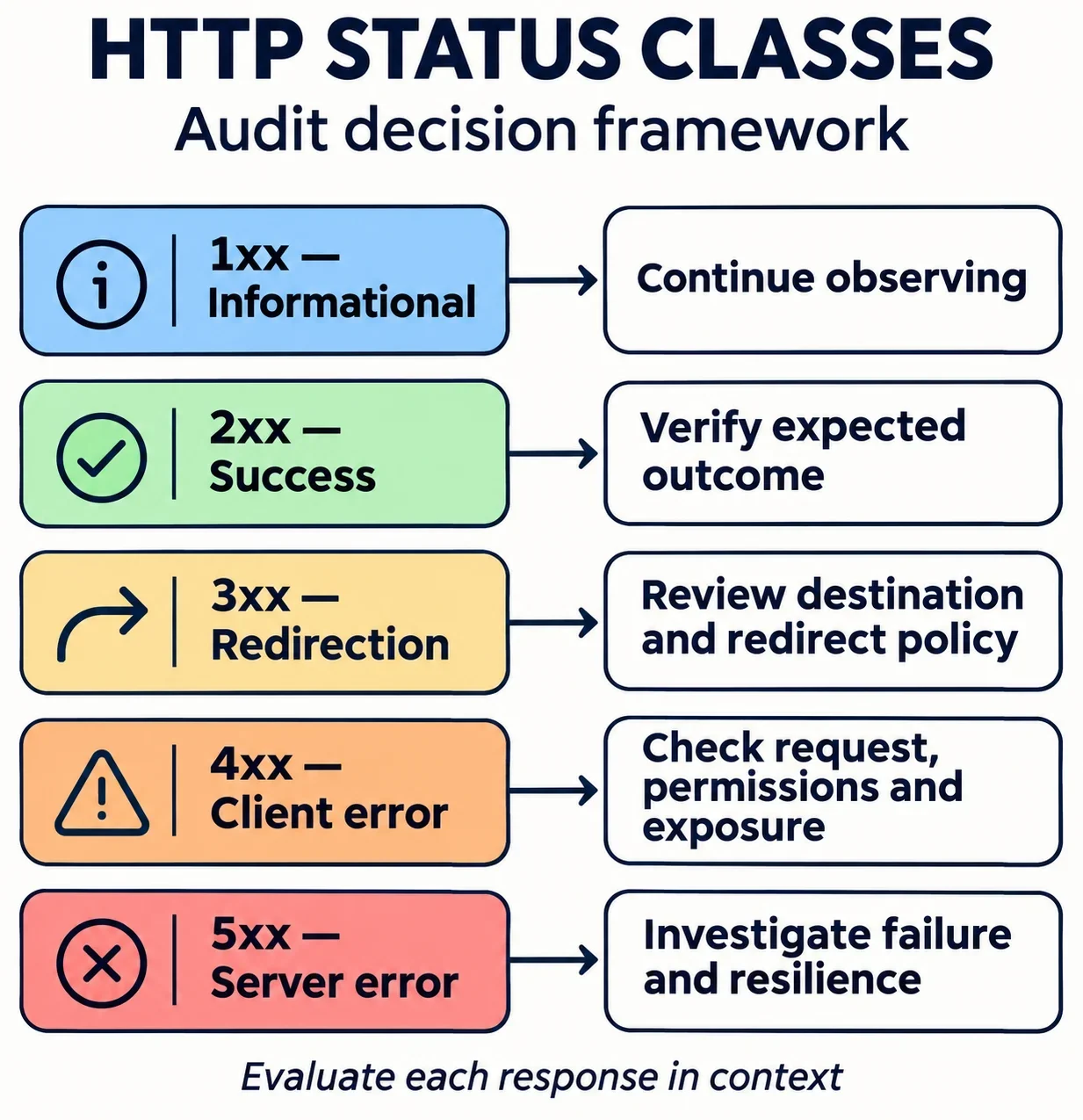
An HTTP status code is one observed signal about a URL at a single moment during a site audit. It does not by itself prove page quality or guarantee future availability. This guide uses five stable classes defined by RFC 9110: informational responses (100–199), successful responses (200–299), redirection messages (300–399), client error responses (400–499), and server error responses (500–599). Site Check Bench status checks observe HTTP status and follow redirect paths. Search readiness reviews server-returned HTML only. Browser protection inspects security headers. Observed availability keeps snapshots for up to 48 entries over seven days with no background polling or SLA percentage.
You do not need prior technical expertise to use this workflow. Each section explains what to enter, what the output may mean, and what decision to make next. Where a capability is not covered by Site Check Bench, the guide notes what to verify separately instead of assuming it exists.
Understand the five HTTP status code classes
HTTP response status codes are grouped into five classes: informational responses (100–199), successful responses (200–299), redirection messages (300–399), client error responses (400–499), and server error responses (500–599). Each class describes a general category of outcome, so auditors can treat the first digit as a quick signal rather than researching every code from scratch.
A 1xx response means the server has received the request and is still processing it. These codes rarely appear as final results in a routine site audit, but they indicate that the connection has not yet reached a definitive outcome.
A 2xx response means the request was understood and accepted. For audit purposes, this is the class auditors generally hope to see, although a successful code only describes what happened at the moment of the check and does not prove that the page will remain available later.
A 3xx response means further action is needed, usually because the requested URL has moved or points to another location. The auditor should review where the redirect leads and whether the redirect type matches the intended site structure.
A 4xx response means the request contains an error or the client cannot access the requested resource. Common examples include malformed requests and missing pages. These findings usually point to link, content, or configuration issues on the site being audited rather than a temporary network glitch.
A 5xx response means the server failed while trying to fulfill the request. This class indicates a problem on the server side, which may be temporary or may require investigation by the hosting provider or server administrator.
Treating each status code as one observed signal at a single moment helps auditors avoid overstating what a check proves. A code can change between checks, so status results should be combined with other observations rather than used as the only measure of page health.
Set up URL inputs for a status check
A URL status check starts with one target URL that you supply directly to Site Check Bench. The tool runs a single observation, follows redirect paths where applicable, and returns observations that include result, timestamp, and context. Because each observation represents a point-in-time signal, it does not prove that a page will remain available tomorrow, nor does it prove page quality or search ranking eligibility.
Before entering a URL, confirm that you are checking the exact address you intend to audit. Include the scheme such as https:// if the page requires it, and use the full path rather than a homepage shortcut when you want to test a specific page or asset. Do not assume that checking one URL provides information about related pages, subdirectories, or the site as a whole.
Site Check Bench does not indicate background polling, recurring checks, or an uptime SLA percentage from a status check alone. If you need repeated availability data, use the separate uptime-check tool rather than relying on a single URL status observation. Availability snapshots are retained separately under that tool’s own limits, not through the URL status check.
The result reflects what the server returns at the moment of the check. Temporary network conditions, maintenance windows, or redirect behavior at that instant can change the outcome. Treat a single result as evidence to investigate further, not as a final conclusion about the URL’s long-term status.
If a check returns an unexpected result, re-enter the exact URL and run another observation to confirm whether the finding is consistent. Compare the result with other checks on the same site only as supporting context, because each URL is observed independently.
Practical checklist:
- Enter the full target URL, including scheme and path where relevant.
- Understand that the check observes status and redirect paths at one moment.
- Treat timestamped output as a snapshot, not continuous monitoring.
- Do not expect an SLA percentage or scheduled polling from this tool.
- Use uptime-check separately if recurring availability observation is needed.
- Verify unexpected results with a repeated check before drawing audit conclusions.
Read successful 2xx codes and decide no further action is needed
A successful HTTP status code means the server received and accepted the request at the moment the check ran. In Site Check Bench, a 2xx observation tells an auditor that the URL returned a response in the 200–299 range, but it does not establish page quality, content accuracy, or lasting availability. The check observes one response at one point in time, so a working result today does not guarantee that the same page will work tomorrow.
Auditors should treat a 2xx result as a baseline signal. It suggests the server is reachable and the requested resource was handled successfully, but it does not confirm whether the HTML contains expected titles, meta descriptions, canonical tags, robots directives, or headings. Those elements require a separate search-readiness review of server-returned HTML. Likewise, security headers are inspected separately, and a successful status says nothing about whether those headers are present, correctly configured, or sufficient for protection.
Response size, latency, and caching headers are separate measurements and are not Lighthouse scores, Core Web Vitals, or browser load-time tests. A 200 response with a large body or slow timing may still warrant performance investigation even though the status itself is successful.
For an audit sequence, record the observed status code, timestamp, and context from the URL status check before moving to deeper reviews. If the page is intended for search visibility, follow up with search readiness. If audience devices vary, follow up with viewport review. If security is a concern, follow up with browser protection. No further action is needed solely because the code is 2xx; action is needed only when other checks reveal gaps or when the auditor has a specific reason to recheck the same URL later.
Interpret redirection 3xx codes and decide whether to review the redirect target
A redirection response in the 300-399 range means the server is sending the auditor to another URL instead of returning the originally requested content. In a site audit, that destination matters as much as the code itself. A permanent redirect should lead to a final page worth keeping in search results and links, while a temporary redirect suggests the original URL may still be intended for future use. Multiple redirects in a chain slow access and can waste crawl budget, so auditors should review the target rather than assume the chain is harmless.
A 301 Moved Permanently response indicates that the requested URL has been assigned a new permanent address. Audit links and bookmarks pointing to the old URL should generally be updated to the final destination, and the redirect target should be checked to confirm it returns a successful response rather than another redirect or an error.
A 302 Found response signals a temporary move. Because the original URL may still be the intended address, auditors should treat it differently from a 301. Before changing links or removing the source page, verify whether the redirect is intentional and time-limited, then confirm where it leads and whether the destination loads successfully.
Other 3xx responses, such as 307 Temporary Redirect and 308 Permanent Redirect, preserve the request method in ways that can matter for forms or API-style endpoints. During an audit, note the exact code, follow the redirect path to its end, and record both the intermediate URLs and the final result. Redirect chains should not be ignored simply because the final page loads; each hop adds latency and can complicate search-engine handling.
When a redirect target cannot be reached or returns a client or server error, treat the original URL as having an unresolved finding. The auditor should document the chain, the final status observed, and whether the redirect appears permanent or temporary before recommending link updates, target repairs, or escalation to the site owner.
Site Check Bench status checks observe HTTP status and follow redirect paths, producing observations that include result, timestamp, and context. The audit output shows what was seen at the time of the check, not a guarantee that the redirect will behave the same later. Auditors should repeat checks after making changes and record whether the redirect target still returns the expected result.
Handle client error 4xx codes and decide whether to remove or replace links
A 4xx status code means the request could not be completed because of a condition perceived to originate from the client side. Site Check Bench’s URL status check records the observed result, timestamp, and context for each URL, so auditors can document exactly what a server returned at the time of checking rather than assuming that a broken link will behave the same way later.
When a page returns 400 Bad Request, the request itself may be malformed or syntactically invalid. An auditor should first verify that the entered URL is complete and correctly encoded before concluding that the destination page has a problem. A simple typo, an extra space, or an unsupported character can produce a 400 response even when the target resource exists.
A 404 Not Found response means the server did not find a current representation for the requested URL. During a link audit, this is often a signal that an internal link, external reference, or bookmarked page should be updated, removed, or replaced. However, a 404 observed once is only evidence about that moment; Site Check Bench does not promise that the same URL will return 404 again, nor does it reveal why the resource disappeared.
Other 4xx results, such as 401 Unauthorized or 403 Forbidden, indicate that access restrictions may apply. These codes do not necessarily mean the content is missing forever; they may mean that credentials, permissions, or network conditions are required. Auditors should record the exact code and avoid treating every 4xx as equivalent.
Site Check Bench search readiness reviews server-returned HTML only, including titles, descriptions, canonicals, robots directives, and heading structure. It does not inspect JavaScript-rendered content, robots.txt, or search index status. Therefore, a page that returns 404 may not receive the same kind of SEO content review as a page that returns 200 OK, and Lighthouse may flag unsuccessful 400- or 500-range statuses as conditions that could interfere with proper indexing. Auditors should not assume that a security-header check substitutes for this status-code analysis; browser protection inspects selected security headers and directives, and a present header can still be misconfigured. It is not a vulnerability scan or security certification.
Practical decision steps for auditors:
- Record the exact 4xx code, timestamp, and affected URL.
- Check whether the URL itself contains encoding errors or obvious typos.
- For 404 findings on links you control, decide whether to restore the resource, redirect to a relevant replacement, or remove the link.
- For 401 or 403 findings, confirm whether restricted access is intentional before changing links.
- Treat 4xx observations as time-bound evidence, not proof of permanent unavailability.
- Combine status results with search readiness and other audit outputs before making final link recommendations.
Readers should confirm current Site Check Bench input limits and output fields directly through the tool interface, because this guide does not specify URL counts, retry behavior, or historical retention beyond what the product documentation states.
Respond to server error 5xx codes and decide whether to escalate to hosting or server support
A 5xx status code means the server failed to load the requested resource because of a server error. In an audit, treat this as an observed signal at the moment of the check, not as proof that the problem is permanent or that no further testing is useful. Temporary failures can appear and disappear, so a single 5xx result should prompt a repeat check under the same conditions before reaching a firm conclusion.
Start by recording the full result, including the exact code, timestamp, and any context returned by Site Check Bench. If the check was run through url-status-check, note whether the observation applies to the original URL only or to a redirect target as well, since status checks observe HTTP status and follow redirect paths. This detail matters because a server error may belong to the destination rather than the address entered.
Decide whether to escalate based on repetition and scope. A one-time 500 Internal Server Error may reflect a transient overload or temporary fault, so re-check the URL after a reasonable interval and compare results across several pages on the same host. If multiple URLs return 5xx errors at the same time, or if the same URL fails repeatedly across checks, the evidence points more strongly toward a hosting or server-side condition rather than a problem with one page. At that point, escalate to your hosting provider or server support and share the observed codes, timestamps, affected URLs, and any patterns you noted.
Do not use a security-header check as a substitute for investigating a 5xx error. Browser protection inspects security headers and selected directives, and Site Check Bench explicitly states this is not a vulnerability scan or security certification. Security headers may be present even while the server is returning errors, so a clean header result does not explain or rule out a 5xx condition.
Also remember what search readiness does and does not cover. It reviews titles, descriptions, canonicals, robots directives, and heading structure in server-returned HTML only. JavaScript content, robots.txt, and search index status are outside this check. A page returning 5xx may not return usable HTML for these elements, so search readiness results should not be interpreted as evidence that the server problem has resolved.
Keep the audit decision practical: verify the observation, repeat the check, look for patterns across URLs and time, document what you saw, and escalate only when repetition or breadth suggests a condition that requires provider documentation or server-side action.
Combine status checks with other Site Check Bench tools in an audit sequence
A URL status check should function as one observation in a sequence, not as a complete verdict on a page. After noting whether a URL returns an informational, successful, redirection, client-error, or server-error status, an auditor can route that URL into other Site Check Bench checks based on what still needs verification.
When the status output is successful, search readiness becomes the next logical step because it reviews titles, descriptions, canonicals, robots directives, and heading structure in server-returned HTML only. JavaScript content, robots.txt, and search index status are outside this check, so a clean status code does not mean a page is ready to appear in search results.
If the auditor needs to understand loading behavior, response measurement observes response latency, downloaded body size, and caching headers from the WordPress server. These observations are not Lighthouse scores, Core Web Vitals, or browser load-time tests, so they should not be presented as performance rankings or speed guarantees.
Browser protection inspects security headers and selected directives when security posture is part of the audit. A present header can still be misconfigured, and this check is not a vulnerability scan or security certification. Therefore, security-header output should support recommendations for configuration review rather than replace dedicated vulnerability assessment.
For availability questions, uptime check keeps snapshots for up to 48 entries over seven days with no background polling or SLA percentage. A status check that shows success at one timestamp does not establish ongoing availability, while retained snapshots can help show whether failures appear repeatedly across the observation window.
Responsive preview tries a public page in common viewport sizes with a direct link when embedding is blocked. This is useful after status checks confirm that a page returns successfully, because viewport behavior cannot be assessed for URLs that are returning errors or redirecting unpredictably.
White-label report can package the sequence into a client-facing document. Because status output includes result, timestamp, and context, the report can separate what was observed from what other checks add. The audit sequence should end with that distinction rather than with a blanket statement that a site is healthy.
A practical sequence might look like this: run the URL status check first; if the result is successful, proceed to search readiness, response measurement, browser protection, uptime check, and responsive preview as needed; if the result is an error, pause the sequence and resolve the status finding before relying on later checks. Each tool output should be recorded with its own timestamp so readers can see when each observation was made.
Record observations, limits, and recommendations in a client report
Each client report should separate what Site Check Bench actually observed from what can safely be concluded. For every URL, record the exact status code, the class it belongs to, the timestamp of the check, and any context produced by the tool, such as redirect paths or returned server-returned HTML details. This creates an audit trail tied to a single observation rather than a continuous guarantee.
The report must state clearly that a status check captures the URL at one moment. A successful code does not prove the page will remain available, and an error code does not necessarily mean the page is permanently broken. Because Site Check Bench does not perform background polling, the report should not imply ongoing monitoring or uptime percentages.
Availability snapshots are another bounded observation. The tool keeps up to 48 entries over seven days. Reports should describe the snapshot window exactly as observed and avoid generalizing it to a full week or longer period unless additional checks are added.
For redirection findings, record whether each redirect appears permanent or temporary, whether redirect chains exist, and whether the final target returns a successful or error status. Recommend reviewing redirect targets when chains are long, when temporary redirects point to destinations that should be indexed, or when permanent redirects send traffic to pages that later return client or server errors.
Client error findings, such as 400 Bad Request or 404 Not Found, should be listed with the affected URL and the observed status. Recommend removing or replacing links to URLs that consistently return errors, but tie the recommendation to the observed evidence and note that server-returned HTML reviews do not cover JavaScript-rendered content, robots.txt, or search index status.
Server error findings should note the specific 5xx code and suggest escalation to hosting or server support when the failure repeats or appears related to server configuration rather than a temporary condition. The report should distinguish between a one-time server failure and a pattern requiring provider documentation.
Other Site Check Bench outputs can support the report. Search readiness can identify issues with titles, descriptions, canonicals, robots directives, and heading structure in server-returned HTML. Response measurements can record response latency, downloaded body size, and caching headers from the WordPress server, but these are not Lighthouse scores, Core Web Vitals, or browser load-time tests. Browser protection can inspect security headers and selected directives, but a present header is not proof of correct configuration and is not a vulnerability scan. Responsive preview can try a public page in common viewport sizes, with a direct link when embedding is blocked.
The final recommendations should be conditional on the observed results. Instead of declaring a page healthy or unhealthy overall, state which checks passed, which returned errors or warnings, and what follow-up actions are reasonable based on the current evidence.