Contents
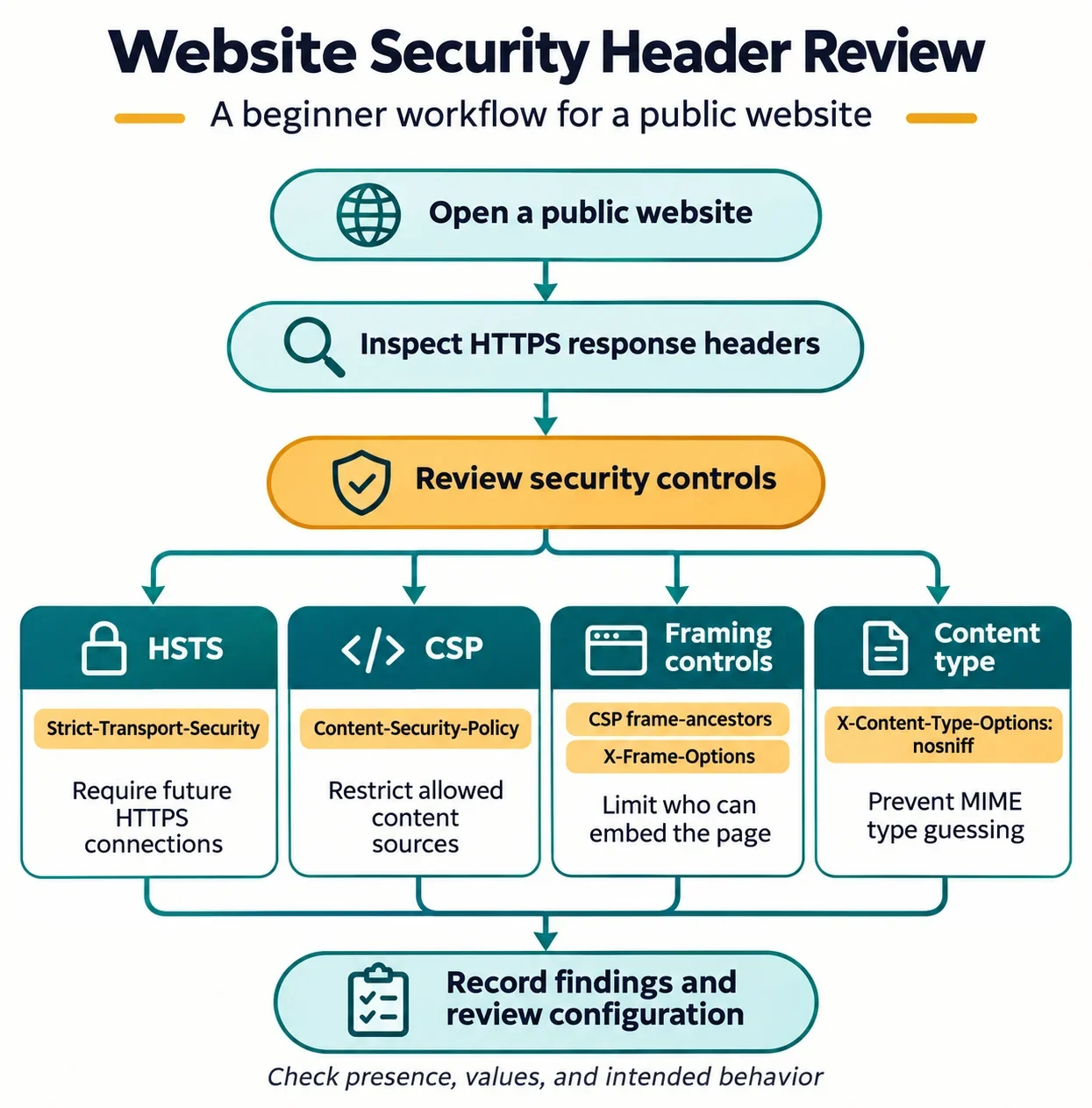
Reviewing website security headers is a practical way to check whether a public site has configured baseline browser protections. A reviewer can inspect response headers such as Strict-Transport-Security, Content-Security-Policy, X-Frame-Options, frame-ancestors, and X-Content-Type-Options to understand whether browsers are being instructed to enforce HTTPS, restrict embedding, and honor advertised MIME types. This workflow focuses on observing public server responses and making informed configuration observations rather than running deep vulnerability scans.
A present header does not guarantee correct protection. Header values can be misconfigured, incomplete, or limited to certain routes, so each observation should be treated as a signal that needs verification before recommending changes. Reviewers should run live checks before delivering client reports and label any sample observations clearly.
This guide covers how to interpret security-header output, evaluate HSTS settings, assess framing controls and content-type options, decide what to report when headers are missing, and determine the appropriate technical owner for recommended fixes.
Browser Protection and Security Header Checks
Security-header reviews begin by collecting public HTTP response headers for a target URL and checking for the presence, absence, and value of key directives. The reviewer should record each observed header and note whether it is missing, present but possibly weak, or present and aligned with common baseline guidance.
Because outputs can differ by route, subdomain, or CDN edge, a single homepage check may not represent the entire site. Reviewers should test multiple representative pages, including login, checkout, and static-asset routes where applicable, and avoid drawing conclusions from one response alone.
The output should describe exactly what was observed for each header:
- Header name
- Present or absent
- Observed value, if any
- Route or URL tested
- Time of live check
A missing header does not automatically mean the site is vulnerable, and a present header does not automatically mean protection is effective. The reviewer’s role is to report observations and suggest that the appropriate owner evaluate whether configuration changes are needed.
Sample observations in exports should be labeled clearly so clients do not mistake illustrative data for live results. Live checks should be run immediately before client reports because headers can change after a deployment, CDN update, or configuration rollback.
Reviewers should avoid running header checks on URLs containing sensitive details, such as session tokens, personal data, or internal identifiers, because request URLs may be logged by intermediaries or included in diagnostic exports.
This is not a vulnerability scan. It is a configuration-observation workflow intended to support informed conversations with hosting, CDN, or application teams.
Practical decision steps
- Identify the URLs to inspect, prioritizing entry pages, authentication pages, payment pages, and static-asset paths.
- Run a live header check on each selected URL.
- Record header names, presence or absence, values, routes, and check times.
- Compare each result against the site’s stated security baseline or organizational policy.
- Flag missing headers and weak values as recommendations for the responsible team, not as confirmed vulnerabilities.
- Label any sample data in exported reports and re-run live checks before delivery.
What the check output should show
For each observed header, the report should capture whether the header is present, absent, or configured with a value that requires further review. If a header appears on one route but not another, the report should note the inconsistency rather than assume site-wide coverage.
Limitations to communicate
A present header can still be misconfigured, and coverage may vary across subdomains, routes, or CDN edges. These observations support configuration discussions but do not replace penetration testing or vulnerability scanning.
Reviewers should not run header checks on URLs containing session tokens, personal data, or internal identifiers, because such URLs may be logged by intermediaries or appear in diagnostic exports.
When to escalate
Route missing or weak headers to the appropriate hosting, CDN, or application owner. The reviewer recommends evaluation, while the owner decides whether to apply an immediate configuration change or adopt a staged rollout plan.
Illustration: a conceptual flowchart showing a beginner workflow for reviewing public website security headers, including HSTS, CSP, framing controls, and content-type options. This is an AI-generated illustration and does not depict an actual browser, website, or live inspection result.
Evaluating HSTS and HTTPS-Only Behavior
The Strict-Transport-Security header instructs browsers to access a website exclusively through HTTPS for a specified period. Reviewers should observe whether the header is present and record its max-age value, whether includeSubDomains is included, and whether a preload directive is visible.
max-age defines how long the browser should remember the HTTPS-only policy. A short max-age provides limited persistence, while a long max-age creates a durable browser expectation. Reviewers should not assert a specific max-age value as universally correct without client context.
includeSubDomains extends the policy to subdomains. Before recommending it, a reviewer should confirm that all subdomains can serve valid HTTPS certificates, because misconfiguration or expired certificates can block legitimate users.
preload signals interest in browser HSTS preload lists. This is a significant step because inclusion can make HTTPS-only behavior difficult to reverse quickly. Reviewers should treat preload as appropriate only after the client confirms operational readiness across all relevant domains and subdomains.
When deciding whether settings are appropriate for a client domain, the reviewer should consider:
- Whether the entire domain and its subdomains already support HTTPS consistently
- Whether certificate renewal processes are reliable
- Whether any legacy clients or internal routes depend on HTTP
- Whether the client has a rollback plan if problems appear
Premature wide rollouts of long max-age, includeSubDomains, or preload can create availability risks if HTTPS is not fully ready. A staged approach with shorter max-age values first is generally more conservative.
HSTS applies only to browsers that honor the header and only after the first successful HTTPS visit unless the domain is preloaded. It does not protect the initial connection or replace server-side HTTPS enforcement. Reviewers should report HSTS as one layer of HTTPS hygiene, not a complete transport-security solution.
Reviewing Framing Controls and Content-Type Options
Farming controls help reduce the risk of clickjacking by telling browsers whether a page may be embedded in a frame, iframe, embed, or object element. Reviewers should check both X-Frame-Options and the Content-Security-Policy frame-ancestors directive.
X-Frame-Options is a legacy header with values such as DENY, SAMEORIGIN, or ALLOW-FROM. It indicates whether a browser should allow rendering in a framing context. CSP frame-ancestors is the modern replacement in supporting browsers and specifies where a page is allowed to be embedded.
When both are present, CSP frame-ancestors generally takes priority in modern browsers that support it. Reviewers should not claim that one header completely replaces the other across all browsers, because older browsers may still rely on X-Frame-Options.
If CSP is present but frame-ancestors is missing, the report should state that framing protection cannot be confirmed from CSP alone. The reviewer can note that X-Frame-Options may still provide framing signals where present, but should avoid overstating CSP’s protective effect when frame-ancestors is absent.
X-Content-Type-Options instructs browsers to follow advertised MIME types rather than guessing them through MIME sniffing. Reviewers should check whether the header is present and commonly set to nosniff, while noting that this header only addresses sniffing behavior and does not validate the correctness of the MIME type itself.
A present header can still be misconfigured. For example, X-Frame-Options might be set to ALLOW-FROM with an unsupported value in some browsers, or CSP frame-ancestors might permit broad embedding sources. Reviewers should describe observed values and recommend that the technical owner confirm behavior across target browsers and routes.
Missing headers should lead to a staged conversation rather than an immediate demand for configuration. The reviewer can ask whether the hosting or CDN owner can test changes in a staging environment before production rollout, particularly for HSTS and CSP, where broad mistakes can affect availability.
The appropriate owner depends on where the header is set. Missing HSTS may belong to the hosting, CDN, or application team; missing CSP often belongs to the application team; framing and content-type headers may be controlled by the web server, CDN, or application configuration. Reviewers should route recommendations accordingly rather than assuming a single team controls all headers.
Header coverage may not apply across all routes. A header present on the homepage might be absent on API endpoints, login pages, or static asset paths. Reviewers should test representative routes and note any gaps in their reports.