Contents
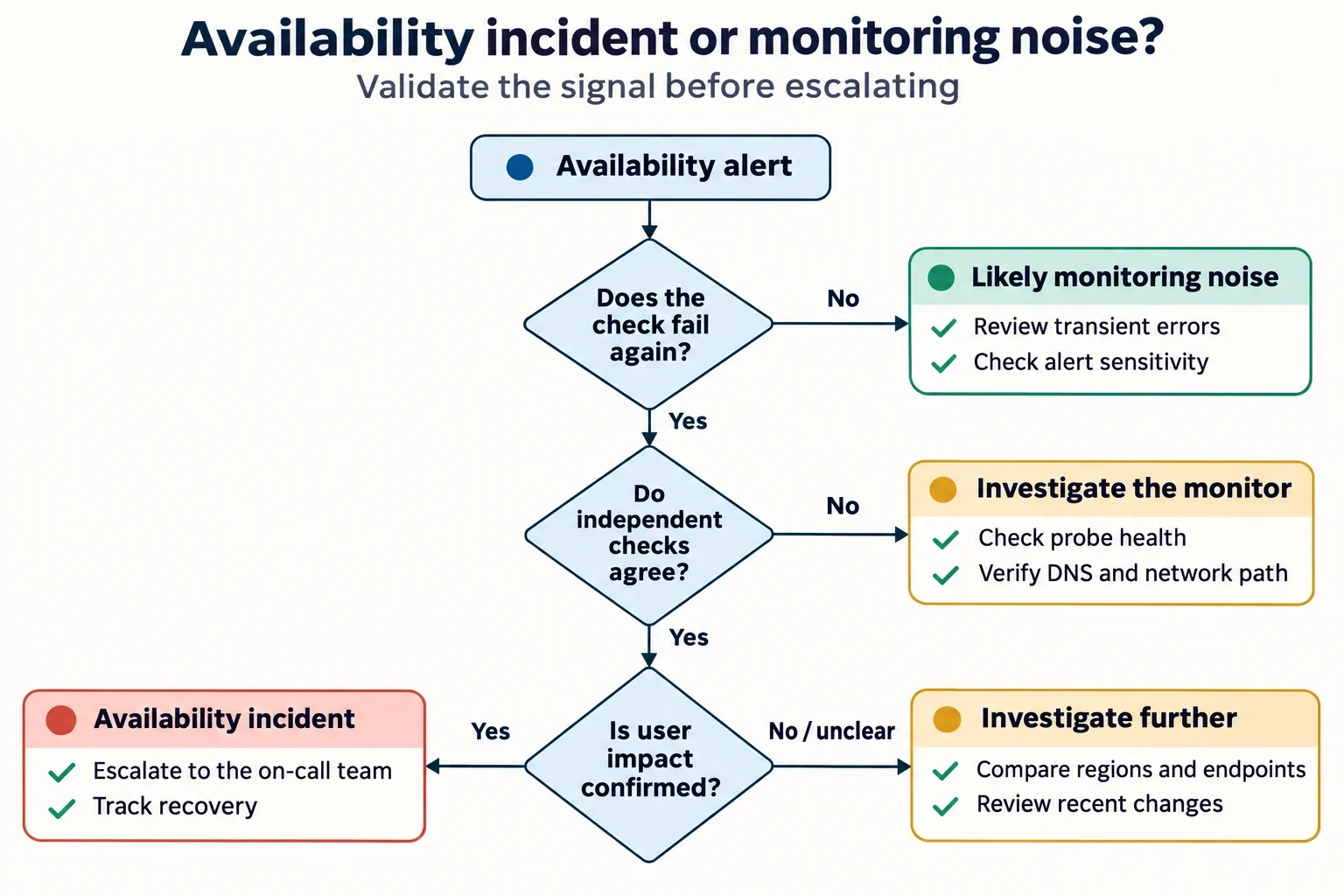
Monitoring tools can surface failed checks, redirects, and HTTP status codes, but a single result is only a snapshot. Beginners often treat every alert as an incident or ignore genuine problems because they cannot tell monitoring noise from real availability issues. This guide shows how to separate observation from conclusion using a point-in-time URL status check and general SRE alerting principles. It does not claim current availability for any specific site, nor does it promise uptime guarantees, pricing, or service-level commitments. Instead, it gives you a practical checklist for deciding when a failed check deserves attention and how to record what you observed before sharing it with others.
Run a focused availability check
Start by entering the web address you want to test into the URL status check input field. The tool accepts a user-supplied URL, so copy the complete address from your browser bar, including https:// or http:// where applicable, before starting a run. The checker performs an HTTP status check and follows the redirect path for the supplied URL, giving you both the final status code and the redirect sequence if one occurs.
When the run finishes, treat the result as a single point-in-time observation. It shows whether the requested URL returned a response at that moment and how redirects were handled, but it does not by itself prove that the site is continuously available or that all user-facing functions are working. A successful HTTP response at one time does not guarantee future availability.
Before drawing conclusions, note the URL exactly as entered and the time you ran the check. Avoid refreshing repeatedly in quick succession to look for a different outcome; repeated manual runs are not a substitute for continuous monitoring and can make it harder to distinguish a temporary response from a sustained issue. If you are comparing results, record each observation separately rather than assuming an earlier result still applies.
If the URL returns an error status or an unexpected redirect chain, that is a signal worth documenting, not an immediate incident declaration. Use this first observation as the starting point for the separation steps described in the following sections, rather than as final proof of an outage or full recovery.
Separate observation from conclusion
A single URL status check tells you what happened at one moment, not whether availability is restored or will stay restored. The check returns an HTTP status code and shows whether the request followed a redirect path for the URL you supplied. A successful response means the server answered at that instant. It does not prove the page remains reachable, that linked resources loaded correctly, or that users in other locations can reach the site.
Because availability can change between checks, treat the result as a time-stamped observation rather than a status certificate. A beginner confidence workflow should therefore record the exact URL, the time of the check, the HTTP status returned, and any redirect behavior observed. If the same check is repeated later and returns a different result, that new result is another separate observation, not proof that the earlier result was wrong.
This distinction matters when deciding whether to escalate. One failed check may indicate a temporary network glitch, a deploy in progress, or a momentary redirect loop. One successful check after an outage does not by itself justify declaring the incident closed. Look for repeated observations over time before moving from “something was observed” to “availability is affected” or “availability is normal.”
If you need to verify current capabilities for the URL status check, use the official tool entry point for sitecheckbench.top rather than assuming behavior from other monitoring products.
Reader questions
- What does one successful HTTP response actually prove?
- Why can a single check not serve as proof of ongoing availability?
- What should you record alongside each observation to make it defensible later?
- When is it reasonable to change an conclusion based on a new check result?
Identify noise versus signal
A failed check or triggered alert is evidence of an observation, not automatic proof that an incident requires action. Beginners should treat every alert as a hypothesis first and then apply a small set of repeatable criteria to decide whether it is signal worth investigating or monitoring noise that can be logged and set aside.
Check persistence across repeated observations
One failed HTTP status check or redirect trace is a single point-in-time observation. It does not establish that users are experiencing an ongoing problem. If the same URL returns the same unexpected result across multiple checks spaced apart in time, the pattern carries more weight than an isolated failure. Transient network blips, brief DNS resolution hiccups, or momentary load spikes can produce a single bad result without representing a real availability incident.
Compare against expected symptom patterns
Alerts are more likely to be actionable when they match symptoms that directly affect user-facing functionality, such as pages failing to load, redirects breaking expected flows, or status codes outside the normal range persisting across checks. An alert tied to an internal metric with no observable effect on the requested URL may be less urgent. Beginners should ask whether the failed result would be noticeable to someone trying to use the site before treating it as an incident.
Evaluate timeliness and reproducibility
Actionable alerts tend to be timely, meaning they arrive close enough to the observed problem that the evidence is still relevant. They should also be reproducible: if you repeat the focused URL status check and confirm the same status code, redirect path, or failure mode, the finding is stronger than a one-off notification. If repeated checks return normal results, the original alert is more likely to be noise.
Avoid cause-based assumptions
Do not infer server overload, code deployment issues, or network provider problems from a status code alone. The check tells you what was observed at that moment, not why it happened. Treat root-cause speculation as separate from the decision to escalate. Record what you saw, then let someone with access to internal systems determine the underlying cause.
Document the decision criteria
Before recommending action, note the URL checked, the time of each observation, the HTTP status and redirect result, whether the failure repeated, and whether user-facing symptoms were apparent. This record separates a defensible incident signal from routine monitoring noise and gives stakeholders a clear basis for any handoff.
Record evidence for confident decisions
A defensible decision begins with recording what was observed, when it was observed, and under what conditions. Rather than acting on a single alert or failed check, a beginner can treat each result as one evidence point and build a short record before recommending any action.
Start with the result timestamp. Record when the check ran and what the tool returned at that moment. A timestamp converts a vague memory of "something seemed wrong" into a concrete observation that can be compared with later checks or shared with a teammate. Without a time, a failed status code could describe an event that happened minutes ago, hours ago, or not at all in the current environment.
Next, capture the context surrounding the observation. Note which URL was checked, what HTTP status was returned, whether redirects were followed, and what the final destination appeared to be. Also record any conditions that might affect the result, such as the network used, the time of day, or whether the check was repeated after the first failure. These details help distinguish a temporary network blip from a persistent availability problem.
Sample observations add confidence when they show a pattern. One failed check is an observation; several failed checks across separate runs are stronger evidence. Similarly, one successful response does not prove a service is healthy, just as one failure does not prove an outage. Recording multiple samples over time lets you see whether results are consistent, intermittent, or improving.
Use a simple structure for each record: the checked URL, the run time, the HTTP status and redirect outcome, any observed conditions, and the number of samples. Keep the record factual. Avoid guessing at root causes such as server overload, DNS failure, or code deployment unless those causes are directly confirmed by available evidence.
Before recommending action, review whether the recorded evidence supports the conclusion. If only one sample exists and conditions are unclear, the responsible step may be to run additional checks rather than escalate. If multiple samples show the same failure under similar conditions, the record can support a clearer recommendation to investigate or notify the appropriate team.
This evidence-first approach keeps recommendations tied to observable results instead of assumptions about monitoring noise.
Handoff findings responsibly
Start by confirming what can be shared before sending observations to a client or stakeholder. A point-in-time check result describes the target URL at the moment it ran, not a guarantee that the site will remain available, so it should be presented as one observation rather than proof of service health.
Use the white-label report export only if the tool instance provides that option for the check you ran. Verify the export behavior in the current interface before assuming your result will include branding, logos, or customized client fields. If export is unavailable or uncertain, a local print or PDF from your browser is a practical alternative for preserving the visible result, including URL, HTTP status, redirect path, and timestamp.
Be aware of labeling limits. Do not assume you can attach unlimited custom labels, client names, or free-form metadata to a report unless the interface explicitly allows it. Treat any labeling field as constrained until you see evidence of its capacity, character limits, or retention rules.
When sharing with stakeholders, attach the timestamp, the exact URL tested, the HTTP status observed, and any redirect chain shown. Avoid interpreting a single successful response as ongoing uptime or a single failure as a confirmed outage. If you must recommend action, frame it as a request for further verification rather than a definitive incident declaration.
Before handing off, ask whether the recipient can access the source check themselves, whether the report will remain available for future reference, and whether any local copy needs to be stored securely if it contains URLs or internal endpoint details. If retention and polling limits are not visible in the interface, direct the stakeholder to the official documentation or support channel for current limits instead of guessing.
Reader questions to consider before export: Does the current interface offer white-label reporting for this check type? What local export format works if branding export is not available? How many labels can be applied, and are there character restrictions? Will the exported report remain accessible after the session ends?