Table of Contents
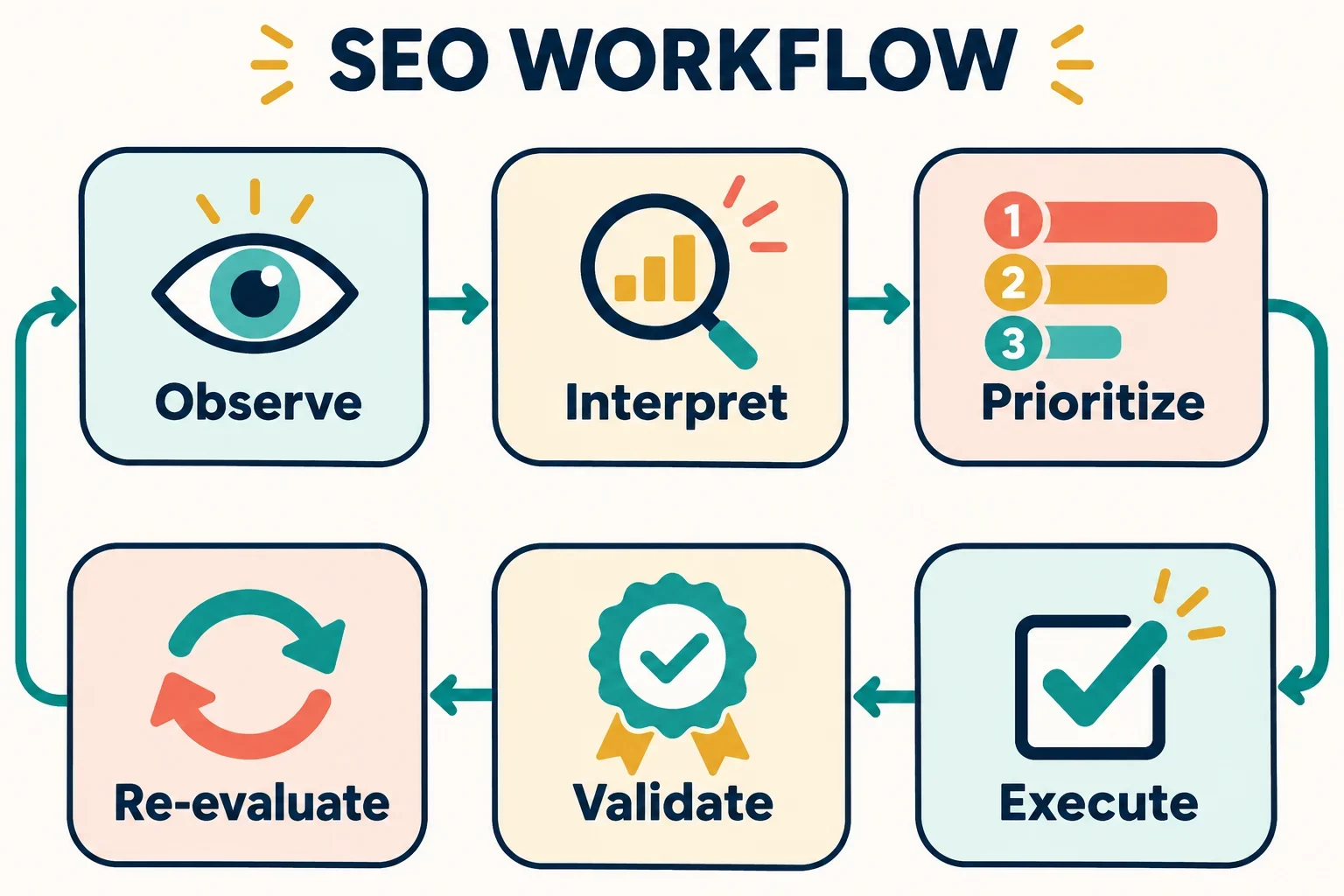
Raw SEO data can feel overwhelming, especially when a technical crawl returns dozens or hundreds of issues. Beginners often struggle to turn those observations into tasks that clients understand and teams can execute. Without a repeatable process, findings pile up into disorganized backlogs, and client reports may overstate certainty or bury the most important actions.
This article explains how to transform technical SEO observations into a bounded, actionable client checklist using a six-stage workflow: observe, interpret, prioritize, execute, validate, and re-evaluate. It also covers how to structure client handoffs, write executive summaries focused on business outcomes, and frame performance metrics without making unsupported promises. Each section includes practical checklists and decision points you can adapt to your own client work.
From Observations to Actionable Workflows
A technical crawl report is only a starting point. It lists what a tool found, not what matters most for a specific website or client goal. To prevent large findings from becoming unmanageable backlogs, practitioners can follow a six-stage workflow: observe, interpret, prioritize, execute, validate, and re-evaluate. Each stage has a clear input and output, which helps beginners work through observations one step at a time instead of reacting to every flagged issue at once.
Stage One: Observe
Observation means gathering data from reliable checks such as URL status reviews, SEO audits, performance checks, security header checks, uptime checks, responsive previews, and white-label reports. The output at this stage is a raw list of findings, not a task list. Beginners should record what each tool returned, the affected pages or elements, and the date of collection, without jumping to conclusions about cause or business impact.
A practical observation checklist might include:
- Record the tool used and the date of the check.
- List each issue with its location, such as a specific URL or page component.
- Note the severity label returned by the tool, if any.
- Separate technical findings from content or structural observations.
- Avoid interpreting business impact during this stage.
Stage Two: Interpret
Interpretation converts raw observations into meaningful statements about the site. The practitioner asks what the finding means for search visibility, user experience, or technical health, and whether the evidence supports that meaning. This stage separates facts from assumptions. For example, a status-code observation is interpreted as a potential access problem only if the affected URL is important to the site’s navigation or business goals.
Interpretation outputs should include:
- A plain-language explanation of each observation.
- The evidence supporting that explanation.
- Any assumptions clearly marked as assumptions.
- Items that need more information before they can be acted on.
Stage Three: Prioritize
Prioritization decides which interpreted observations become execution tasks. A bounded sequence focuses first on blockers, then impact, evidence, dependencies, and effort. Blockers are issues that prevent search engines or users from accessing or using the site. Impact considers how much the issue could affect business-relevant outcomes. Evidence checks how confidently the issue is linked to a measurable problem. Dependencies identify whether another task must finish first. Effort estimates the time and resources needed.
A simple prioritization table can help:
| Priority Factor | What to Ask | Example Decision |
|---|---|---|
| Blocker | Does this prevent crawling, indexing, or core user actions? | Fix immediately |
| Impact | Could this meaningfully affect traffic, conversions, or usability? | Schedule soon |
| Evidence | Is the link between observation and problem well supported? | Verify before acting |
| Dependencies | Does another task need to complete first? | Sequence accordingly |
| Effort | How much time and skill does the fix require? | Fit into available capacity |
Stage Four: Execute
Execution turns prioritized observations into bounded tasks. A bounded execution task is different from an unformatted SEO observation because it includes a specific action, owner, target location, acceptance criteria, and due date. For example, instead of noting “meta descriptions are missing,” a bounded task states “write unique meta descriptions for the ten highest-traffic product pages by Friday, owned by the content editor.”
The execution checklist should include:
- Task name and description.
- Specific URLs or page templates affected.
- Assigned owner and due date.
- Definition of done or acceptance criteria.
- Any dependencies that must be resolved first.
Stage Five: Validate
Validation confirms that a requested implementation was carried out correctly. Beginners should not assume a task is complete because it was assigned. Re-run the relevant check, such as a URL status check, SEO audit, performance check, security header check, uptime check, responsive preview, or white-label report, and compare the result against the acceptance criteria. If the issue persists, return it to execution rather than marking it closed.
Validation steps include:
- Re-run the original check on the affected URLs.
- Confirm the finding no longer appears or has changed to the expected state.
- Document the post-fix result and date.
- Escalate any item that fails validation after a reasonable attempt.
Stage Six: Re-evaluate
Re-evaluation looks at the overall workflow after validation. The practitioner reviews whether priority decisions were accurate, whether effort estimates matched reality, and whether new observations have emerged. This stage turns a one-time fix into a repeatable client process. Re-evaluation can happen weekly, monthly, or after major site changes, depending on the client’s needs.
A re-evaluation checkpoint might ask:
- Did the resolved issues produce the expected change in site health?
- Are there new crawl findings that need interpretation?
- Should priorities change based on recent results?
- Is the client receiving updates at a useful frequency?
By moving through these six stages, beginners can avoid being overwhelmed by large technical reports and instead deliver clear, bounded work to clients.
Client Handoffs and Communication Checklists
Even the best execution workflow fails if clients cannot understand what was done, why it matters, or what happens next. Client handoffs should translate technical findings into business-relevant language, with clear boundaries around what the data can and cannot guarantee.
Structuring Client Reports
A client SEO report should be organized so a non-technical reader can find the outcome, the evidence, and the next action without digging through raw data. Recommended sections include:
- Executive summary: outcome, evidence-based explanation, and decision or next action.
- Observations summary: plain-language list of issues found.
- Prioritized tasks: what will be done, by whom, and by when.
- Validation results: what was confirmed after execution.
- Re-evaluation notes: what to watch next and when the next review occurs.
Reports should avoid promising specific ranking improvements, traffic numbers, or timelines unless those figures are supported by direct evidence from the client’s own analytics or search console data. Metrics should be framed around business objectives, such as improving page access, reducing errors, or supporting campaign landing pages, rather than claiming guaranteed SEO outcomes.
Writing an Executive Summary
An executive summary for client reporting should contain three short parts: the outcome, the explanation supported by evidence, and the decision or next action. Each part serves a distinct purpose.
- The outcome states what changed or what was found, in business terms. Example: “Ten high-traffic product pages now have unique meta descriptions.”
- The explanation connects the outcome to the evidence. Example: “Our audit identified missing meta descriptions on these pages, and rewrites were completed and validated on [date].”
- The decision or next action tells the client what happens next. Example: “We will monitor click-through rates in the next reporting period and re-evaluate if no change is observed.”
Keeping each part short helps clients absorb the information quickly and decide whether to approve further work.
Framing Metrics Around Business Objectives
Performance metrics should be tied to what the client actually cares about, such as leads, sales, support contacts, or brand visibility. Instead of presenting raw crawl counts, explain how a technical improvement could support a business goal. For example, fixing broken internal links may help users reach product pages more reliably; improving page speed may support a better experience on mobile devices.
Practitioners should avoid overstating certainty. Use language such as “supports,” “may improve,” or “is intended to help” rather than “will increase rankings by X percent.” If a metric cannot be verified from the client’s own data, label it as an observation or hypothesis, not a confirmed result.
Client Handoff Checklist
Before sending a report or completing a handoff, verify the following:
- The executive summary contains an outcome, an evidence-based explanation, and a next action.
- Technical terms are either defined or replaced with plain-language equivalents.
- Each task has an owner, due date, and acceptance criteria.
- Validation results are included for completed work.
- Uncertainty is clearly marked where evidence is limited.
- The next review date is stated.
Reader Questions to Ask Before Sending a Report
- What business outcome does this report support?
- Which findings are blockers, and which are improvements?
- What evidence supports each claimed outcome?
- What is the client expected to decide or approve next?
- When will we re-evaluate the results?
These checkpoints keep communication focused and prevent clients from being overwhelmed by technical detail.