Contents
A successful HTTP response often feels like proof that a website is healthy. After all, the server returned 200 OK, so everything must be working. This assumption is one of the most common mistakes in beginner confidence workflows. HTTP status tells you what happened for one request at one time. It does not promise that the same result will happen again, that the visible content is correct, that search engines can index the page, that security headers are properly configured, or that a browser can fully render the page.
This guide explains the narrow meaning of a successful HTTP response, identifies common overconclusions, connects status results to sitecheckbench.top’s stated limits, and offers a practical decision framework for deciding what to review next. Readers can use this as a reference when interpreting url-status-check results, SEO audits, performance measurements, security-header checks, uptime checks, responsive previews, and white-label reports.
What a successful HTTP response proves
The meaning of a successful status code
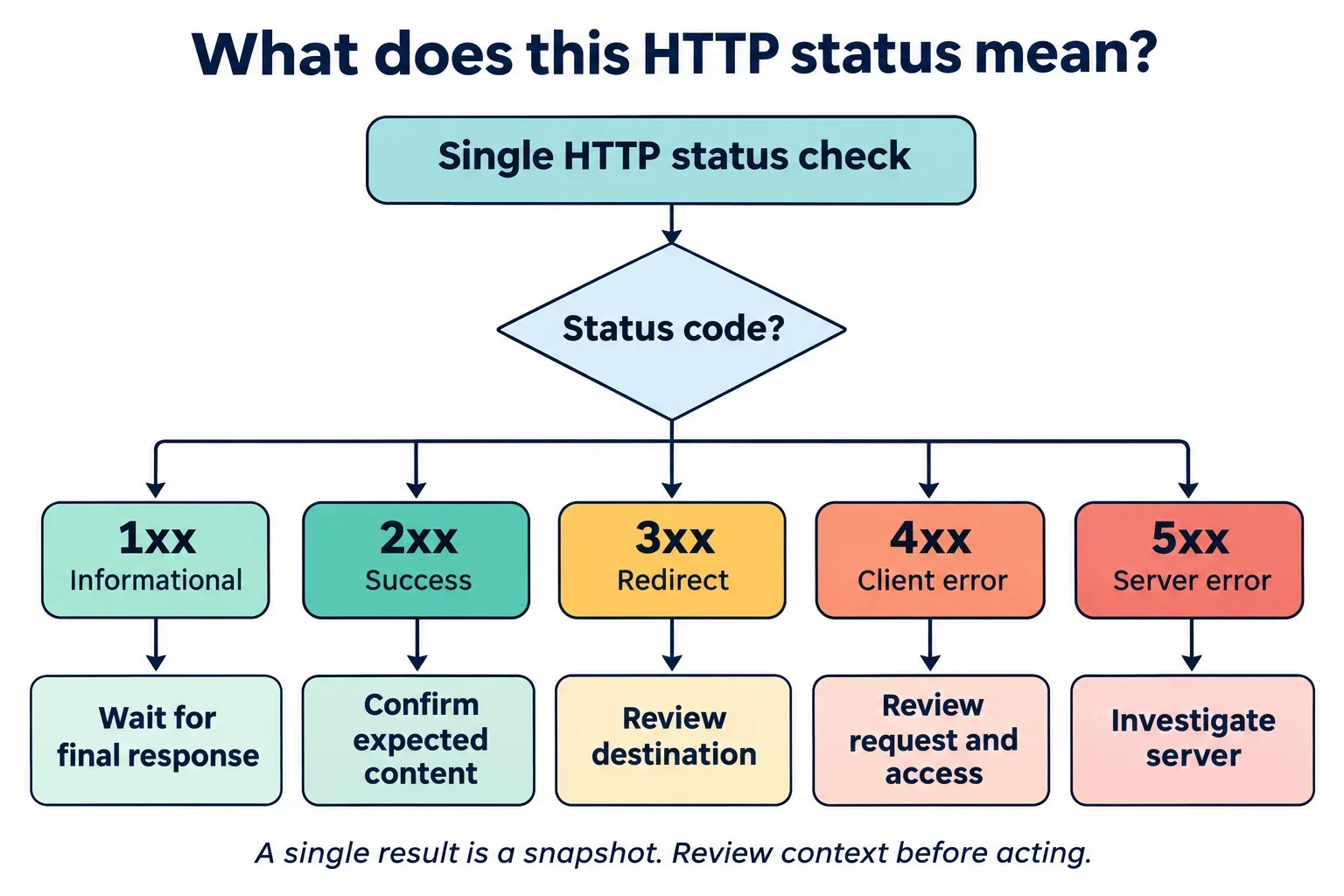
HTTP responses are grouped into five classes: informational (100–199), successful (200–299), redirection (300–399), client error (400–499), and server error (500–599). A successful status means the server has accepted and acted on the request in some way. For a GET request, a 200 OK response indicates that the resource has been fetched and transmitted in the message body.
A successful response also tells you that the request reached the server and that the server chose to answer with a code in the 2xx range. It does not, by itself, tell you whether the resource will remain available, whether the body content is accurate, whether search engines will index it, whether security settings are adequate, or whether every asset on the page loaded.
What a single observation can support
A single successful check supports only the following narrow conclusions:
- One request to the specified URL received a successful status code at the time of the check.
- For GET requests with a 200 OK response, the server transmitted a message body.
- The observation includes a result, timestamp, and context, which can be used as a point-in-time reference.
- A 200 OK response is cacheable by default, though caching behavior depends on additional headers and client configuration.
These conclusions are method-specific and moment-specific. They do not extend to other URLs, other times, or other aspects of the site such as performance, security, or search visibility.
What successful does not mean for redirect statuses
Redirection responses such as 3xx indicate that further action is needed to complete the request. A redirect can be part of normal operation, but it is not the same as a direct 200 OK for availability decisions. The destination and redirect chain matter, and a successful response to a redirect request only proves that the redirect response itself was received successfully.
What a successful HTTP response does not prove
Future availability
A successful response is a moment-in-time observation. It does not confirm that the site will remain available tomorrow, next week, or continuously. One 200 OK result cannot be treated as an uptime guarantee or service-level commitment.
Content correctness
Receiving a body does not mean the body contains the intended content. A page can return 200 OK with outdated information, placeholder text, missing images, broken internal links, or incorrect pricing. Status alone does not validate what is inside the response body.
SEO readiness
A successful status does not mean search engines can or will index the page. Search readiness depends on titles, descriptions, canonical tags, robots directives, heading structure, and other factors. JavaScript-generated content, robots.txt rules, and actual index status are separate considerations outside a basic HTTP status observation.
Security health
A 2xx response does not prove that security headers are correctly configured or that the site is free of vulnerabilities. A security header may be present but misconfigured. A status check is not a vulnerability scan or a security certification.
Full page rendering
A successful response for the main HTML document does not prove that stylesheets, scripts, images, iframes, or other subresources loaded correctly. It also does not measure browser load time, interactivity, visual stability, or Core Web Vitals.
All user experiences
One successful request from one location does not represent every visitor, every device, every network, or every viewport. Rendering can differ across screen sizes, and a page that works in one context may behave differently elsewhere.
How to interpret sitecheckbench.top observations
Moment-in-time checks, not uptime guarantees
sitecheckbench.top’s availability check reviews HTTP status and follows the redirect path before the user decides what needs attention. Each observation includes a result, timestamp, and context. This design treats each check as a single observation rather than continuous monitoring. There is no background polling and no implied SLA from a single successful result.
Server-returned HTML only
The status check observes what the server returns. It does not replace a browser load-time test, Lighthouse audit, or Core Web Vitals measurement. Response measurements can observe latency, downloaded body size, and caching headers, but they are not browser performance scores.
SEO checks are scoped
The search-readiness check reviews titles, descriptions, canonicals, robots directives, and heading structure in returned HTML. JavaScript content, robots.txt, and search index status are outside this check. A page can pass an HTTP status check while still having SEO issues that require separate review.
Security-header checks are informational
The security-header check inspects security headers and selected directives to support an informed configuration decision. A present header can still be misconfigured. This is not a vulnerability scan or security certification.
Responsive preview is a visual aid
The viewport review lets users try a public page in common viewport sizes, with a direct link when embedding is blocked. Large viewports scroll while the page stays the same width. This is a preview aid, not proof of universal mobile friendliness.
What the documentation leaves open
Supplied documentation does not answer every practical policy question. For example, it does not specify how long results are retained, whether checks can be scheduled automatically, what retry behavior applies after a 5xx error, or how white-label reports are branded. Readers should check sitecheckbench.top directly for current terms, limits, and feature availability before relying on any specific workflow.
Using official sources
For status-code definitions and behavior, readers can consult MDN’s HTTP status documentation. For site-specific features and limits, check sitecheckbench.top’s own help pages and reference materials.
Deciding the next step after a status check
A decision framework for status results
Use the status code as a starting signal, not a final verdict. The following table maps common outcomes to suggested next steps without overstating what the status proves.
| Status class | What it suggests | Suggested next step |
|---|---|---|
| 1xx informational | Interim response | Wait for the final status before deciding. |
| 2xx success | One successful request at one time | Verify content, links, and key assets if this is a user-facing page. |
| 3xx redirection | Further action needed | Inspect the redirect destination and chain; do not treat it as identical to 200 OK for availability decisions. |
| 4xx client error | Likely request problem | Check the URL, method, headers, and authentication; confirm whether the resource exists at the requested path. |
| 5xx server error | Server failed to fulfill a valid request | Retry after a suitable interval, check server-side health, and escalate if errors persist. |
When a successful response still needs review
Mark a page for review even after 200 OK if any of the following apply:
- The page is user-facing and contains time-sensitive information.
- Content appears outdated, blank, or unexpected.
- Key images, stylesheets, or scripts fail to load.
- Security headers are missing or appear misconfigured.
- The page uses JavaScript to render critical content.
- SEO elements such as titles, descriptions, canonicals, or robots directives need verification.
- The page must work across multiple viewport sizes.
Distinguishing response measurements from browser tests
Response measurements observe latency, downloaded body size, and caching headers from the server. They are not Lighthouse scores, Core Web Vitals, or browser load-time tests. If you need to understand real-user loading performance, plan a separate browser-based test rather than inferring it from HTTP timing.
What a 202 Accepted status means
A 202 Accepted response indicates that the request has been received but not necessarily completed. It does not tell you whether the requested action actually finished. Treat it as an acknowledgment, not a completion confirmation.
Turning observations into actions
- Record the status code, timestamp, and URL from the check.
- Compare the result against the expected behavior for that page.
- Decide whether the status alone answers your question, or whether content, SEO, security, performance, or rendering review is needed.
- Schedule follow-up checks if ongoing availability matters, rather than assuming one success proves future reliability.